Deploy a Pizza Shop Network on Cisco Packet Tracer
In this video, we'll design and configure a small pizza shop network using Cisco Packet Tracer. We will simulate a real network deployment by understanding business requirements, designing and planning the network layout, configuring the network, and verifying that everything works as we planned and designed.
Packet Tracer Lab
Packet Tracer Lab for Pizza Shop
Timestamps
- 00:16 Understanding the business requirements
- 00:30 Designing and planning the network topology
- 02:30 Implementing, creating, and cabling the network
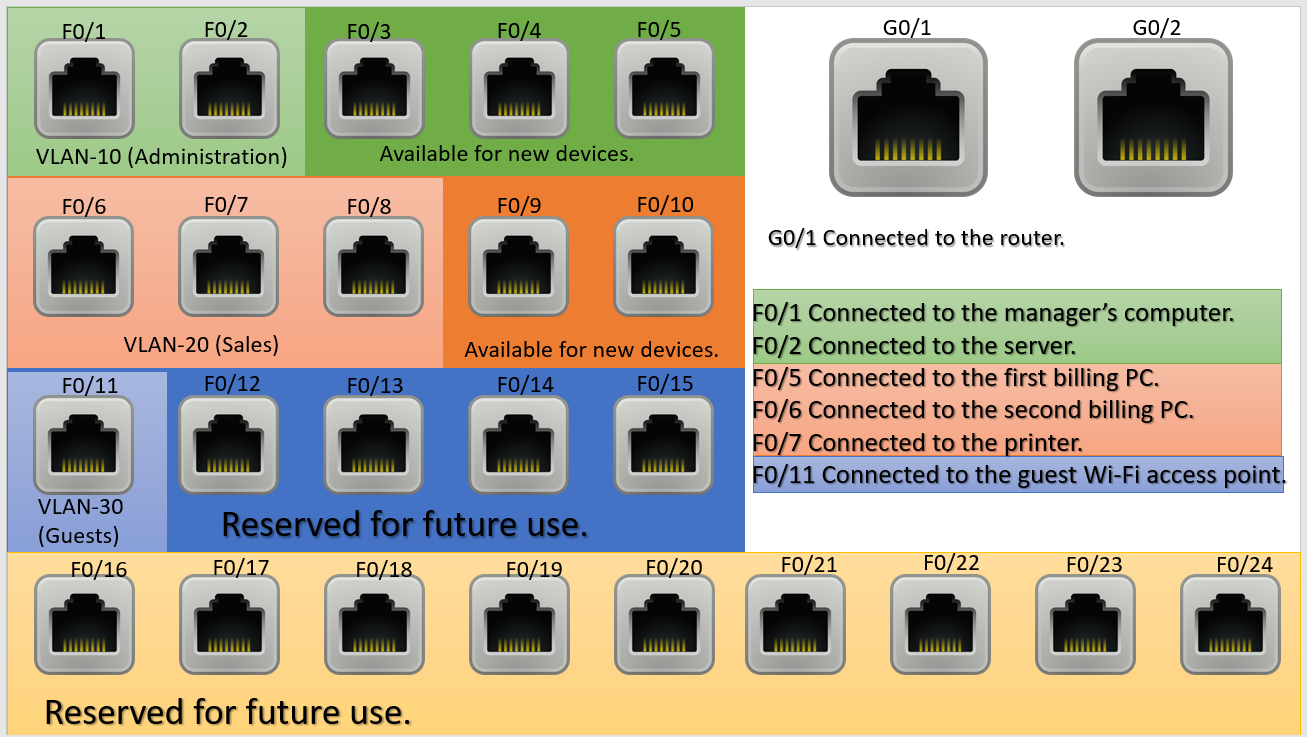
- 03:40 Blueprint for the network cabling and design
- 05:47 Basic Cisco switch configuration for the business network
- 05:54 Changing the default hostname of the switch
- 05:58 Understanding and disabling the NS-domain lookup
- 06:30 Securing the privileged mode and encrypting passwords saved in the running configuration
- 06:47 Setting the login banner
- 07:00 Securing the console line login with a password
- 07:48 VLANs configuration and implementation
- 10:10 Creating a virtual interface for remote management
- 10:20 SSH configuration for remote login
- 11:20 Saving the configuration
- 11:30 Basic Cisco router configuration for the business network
- 12:36 Router-on-stick configuration and implementation
- 14:14 Configuring the DHCP server on the router
- 15:30 Creating and implementing ACLs to secure our business network from customers
- 16:50 Verifying and saving configuration on the router
- 18:00 Wireless Access point configuration
- 18:40 Testing and verifying the network
Layout plan
Conclusion
Whether you are looking for a realistic Cisco Packet Tracer lab, practicing Cisco routers and switches configuration, or studying for CCNA, this lab is designed to help you build practical, real-world networking skills.
Author Laxmi Goswami Updated on 2026-08-29