IPv4 Header Structure and Fields Explained
An IPv4 packet contains a header and a payload. The payload carries data from an upper-layer protocol. The header contains addressing and control information that devices use to process and forward the packet. In this tutorial, I will explain the IPv4 header field by field. If you are preparing for CCNA, CompTIA Network+, or a Linux networking exam, understanding this header will help you interpret packet captures, troubleshoot routing problems, and understand Quality of Service (QoS).
The Architecture of the IPv4 Header
RFC 791 defines the IPv4 header format. Its fields are arranged in 32-bit (4-byte) rows. The header contains 20 bytes without options and can grow to 60 bytes when options are present. The format is commonly described using 13 fields, including the optional Options and Padding area.
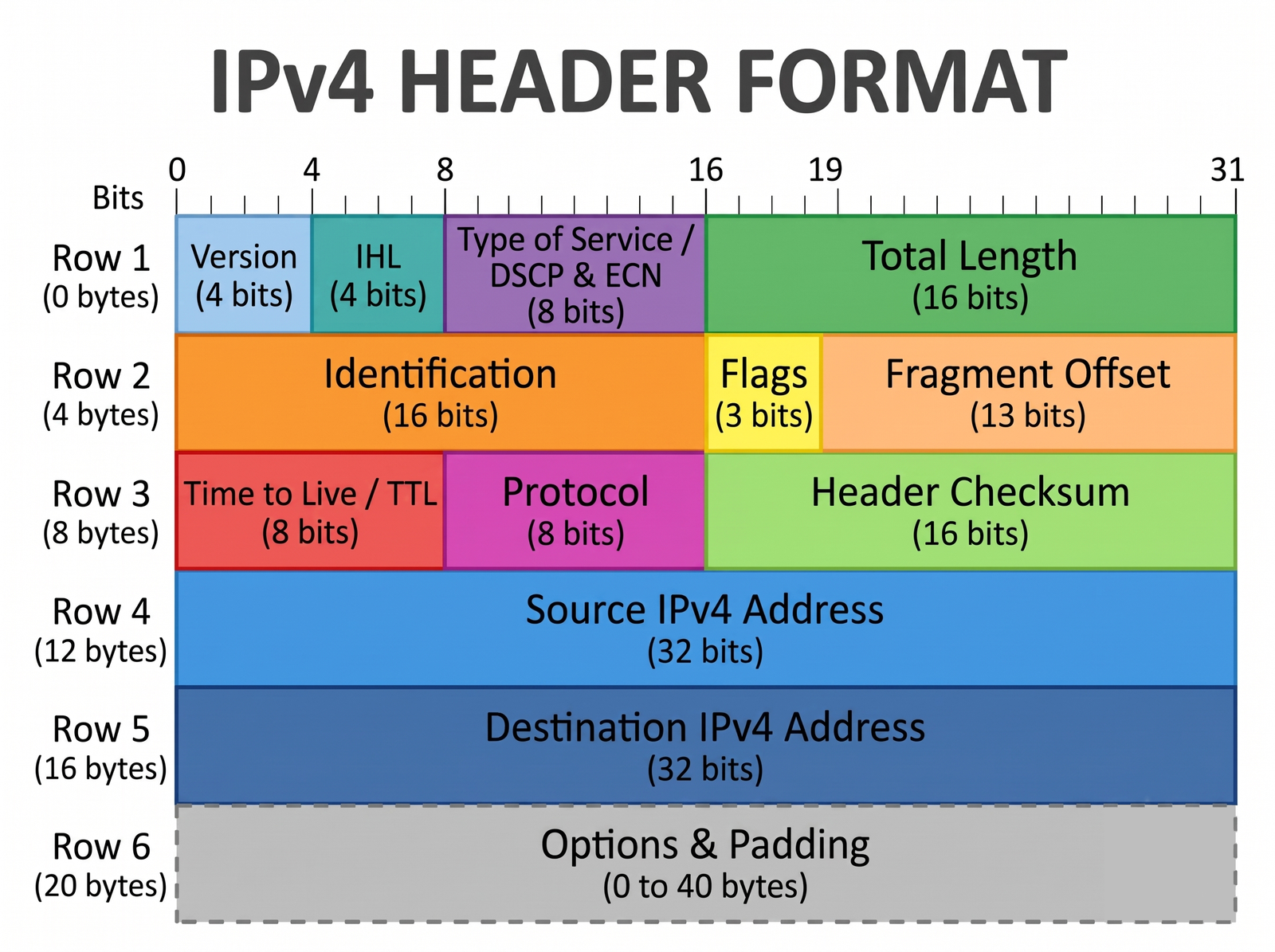
The following table summarizes the fields and their functions.
| Field | Size | Purpose |
|---|---|---|
| Version | 4 bits | Identifies IPv4 using the value 0100. |
| Internet Header Length (IHL) | 4 bits | Specifies header length in 32-bit words. |
| DSCP and ECN | 8 bits | Provides traffic classification and congestion notification. |
| Total Length | 16 bits | Specifies the entire IPv4 packet length in bytes. |
| Identification | 16 bits | Helps identify fragments for reassembly. |
| Flags | 3 bits | Controls fragmentation. |
| Fragment Offset | 13 bits | Locates fragment data in 8-byte units. |
| Time-to-Live (TTL) | 8 bits | Limits how long a packet can be forwarded. |
| Protocol | 8 bits | Identifies the protocol carried in the payload. |
| Header Checksum | 16 bits | Checks the IPv4 header for errors. |
| Source Address | 32 bits | Identifies the source IPv4 address. |
| Destination Address | 32 bits | Identifies the destination IPv4 address. |
| Options and Padding | Variable | Supports optional functions and 32-bit alignment. |
Examining Every IPv4 Header Field
Now let's learn what each field does and how you can use it when analyzing packets.
1. Version (4 Bits)
The first four bits identify the IP version. IPv4 uses the binary value 0100, which equals 4 in decimal. IPv6 uses a different packet format, beginning with version value 0110. Devices process packets according to the supported IP version and its header format.
2. Internet Header Length (IHL) (4 Bits)
The IHL field tells a device where the IPv4 header ends and the payload begins. It expresses header length in 32-bit words, so you multiply its value by four to obtain bytes.
- Minimum: IHL 5 means 5 × 4 = 20 bytes.
- Maximum: IHL 15 means 15 × 4 = 60 bytes.
Tip: If you see an IHL value of 0101 in Wireshark, convert it to decimal 5 and multiply by 4. The header is 20 bytes long.
3. Differentiated Services and ECN (8 Bits)
RFC 791 originally called this byte the Type of Service (ToS) field. Modern usage divides it into two parts:
- DSCP (6 bits): Marks traffic for differentiated handling under a network's QoS policies. A marking does not guarantee priority unless network devices apply the corresponding policy.
- ECN (2 bits): Allows compatible network devices to signal congestion without necessarily dropping packets. Endpoints must support ECN for this signaling to be useful.
4. Total Length (16 Bits)
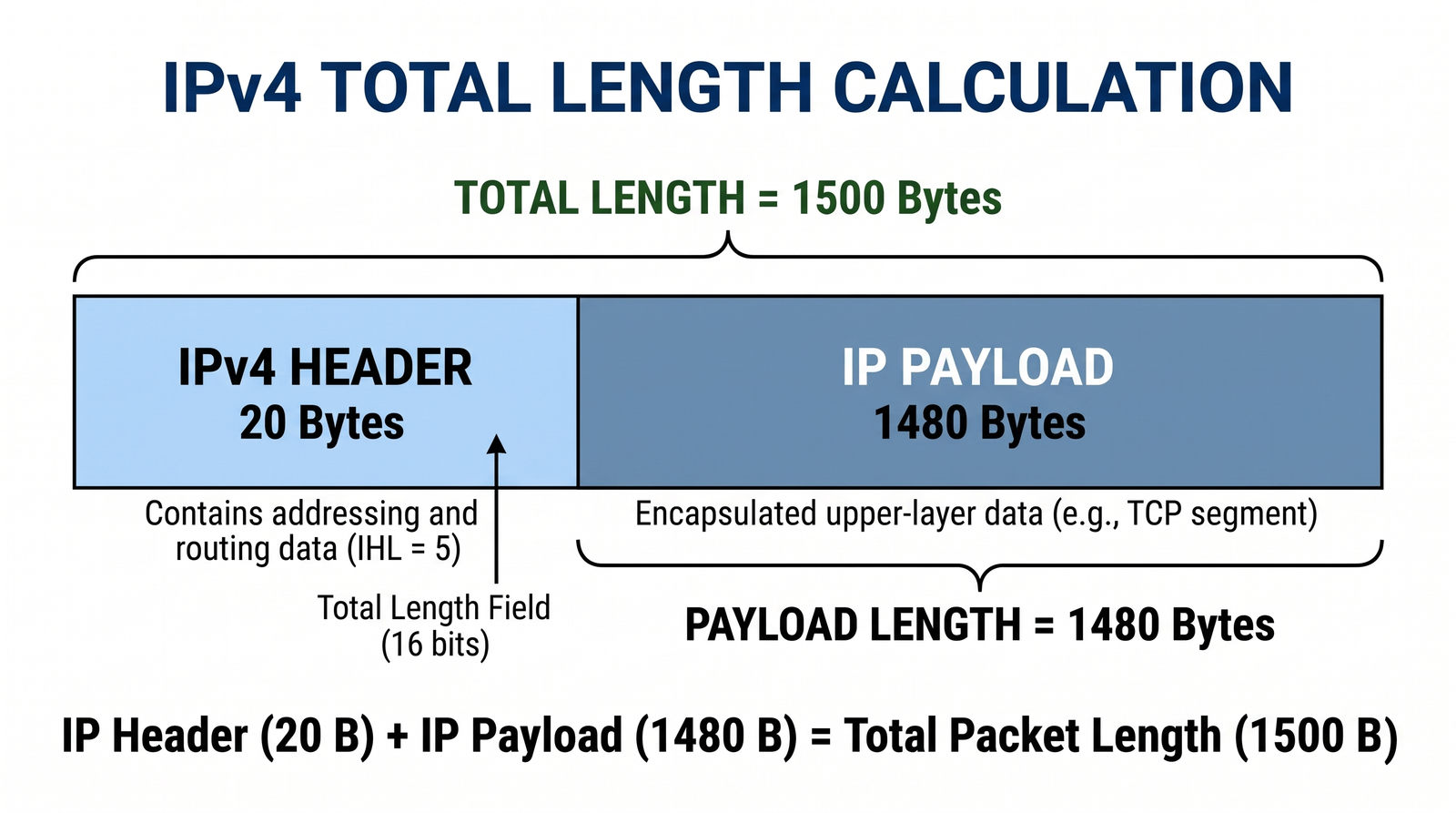
Total Length specifies the complete IPv4 packet size, including the header and payload. Its maximum value is 65,535 bytes. The minimum is 20 bytes for a packet containing only the base header.
For example, if Total Length is 1,500 bytes and IHL indicates 20 bytes, the IPv4 payload is 1,480 bytes. If that payload carries TCP, it includes the TCP header as well as TCP application data.
5. Fragmentation: Identification, Flags, and Fragment Offset
Fragmentation may be needed when an IPv4 packet exceeds the Maximum Transmission Unit (MTU) of the next link. A router can fragment a packet if fragmentation is permitted. If the Don't Fragment flag is set, it must discard an oversized packet instead.
- Identification (16 bits): Fragments of one datagram share an identification value. The destination uses it together with the source address, destination address, and Protocol field for reassembly. RFC 6864 clarifies that this value need not be unique for atomic datagrams that cannot be fragmented.
- Flags (3 bits): The reserved bit must be zero. Don't Fragment (DF) prevents fragmentation. More Fragments (MF) is set on fragments followed by additional fragments and cleared on the last fragment.
- Fragment Offset (13 bits): Specifies where fragment data belongs in the original payload, measured in 8-byte units. Multiply the offset by 8 to obtain its byte position.
When DF is set and a router cannot forward the packet because of the MTU, it normally sends an ICMP Destination Unreachable message with the Fragmentation Needed code.
Tip: Traditional IPv4 Path MTU Discovery uses DF and ICMP Fragmentation Needed messages to determine the largest packet that can travel along a path without fragmentation.
6. Time-to-Live (TTL) (8 Bits)
TTL prevents packets from circulating indefinitely in routing loops. Although originally defined with time-based behavior, it normally acts as a hop limit. Each forwarding router reduces TTL by at least one, typically exactly one. When a packet's TTL expires, the router discards it and normally sends an ICMP Time Exceeded message. The traceroute and tracert utilities use this behavior to discover network hops.
7. Protocol (8 Bits)
The Protocol field identifies the protocol carried inside the IPv4 packet. It is not limited to Layer 4 transport protocols. Common values include:
- 1: ICMP
- 6: TCP
- 17: UDP
- 47: GRE
- 89: OSPF
8. Header Checksum (16 Bits)
The Header Checksum detects certain errors in the IPv4 header, but it does not cover the payload or guarantee complete packet integrity. Because a router changes TTL while forwarding, it must update the header checksum. A packet with an invalid header checksum is discarded. TCP and UDP have separate checksum mechanisms for their respective segments or datagrams.
9. Source and Destination IPv4 Addresses (32 Bits Each)
The Source Address identifies the packet's sender, while the Destination Address identifies its intended destination. Routers use the destination address, routing information, and applicable policies to select a forwarding path. Network Address Translation (NAT) devices may modify either address as a packet travels through the network.
10. Options and Padding (Variable Length)
IPv4 options are uncommon in modern networks. Examples include Record Route, Timestamp, and Source Routing. Some network devices filter packets containing options because of processing or security concerns. Padding aligns the header to a 32-bit boundary, keeping its length a multiple of four bytes.
Summary and Practical Takeaways
When you inspect an IPv4 packet in Wireshark or prepare for a certification exam, remember these points:
- The standard IPv4 header is 20 bytes, and its maximum length is 60 bytes.
- IHL measures header length in 4-byte units.
- DSCP supports QoS classification, while ECN supports congestion signaling.
- TTL limits packet forwarding and helps traceroute identify hops.
- Routers update the IPv4 header checksum when they change TTL.
- Identification, Flags, and Fragment Offset support fragmentation and reassembly.
Author Laxmi Goswami Updated on 2026-11-15