CDP Cisco Discovery Protocol Guide with Examples
CDP is a Cisco proprietary protocol. It works only on Cisco devices. It operates at the data link layer. It automatically collects hardware information from directly connected Cisco devices. It is enabled by default on all routers and Catalyst switches. Only directly connected devices can exchange CDP messages. CDP messages are not forwarded, so information is limited to directly connected devices. They are generated as Layer 2 frames and distributed through multicast.
CDP Information
CDP messages include the following information:-
- IOS version number
- Hardware platform
- Hardware capabilities
- Layer 3 address (IP address) of the device
- Interface’s name that generates a CDP message
- Port ID
- The number of seconds for the CDP advertisement is valid
- Device type
- Name of the device configured with the hostname
CDP messages are generated every 60 seconds. Hold-down time for a missing neighbor is 180 seconds. Since CDP is a layer two protocol, CDP messages are not routed across the device.
CDP Lab setup
Set up a practice lab as shown in the following image. You can use any network simulator software or real devices for it. This tutorial uses Packet Tracer. It also provides download links for the lab used in it, with and without configuration.
Packet Tracer lab for CDP without configuration
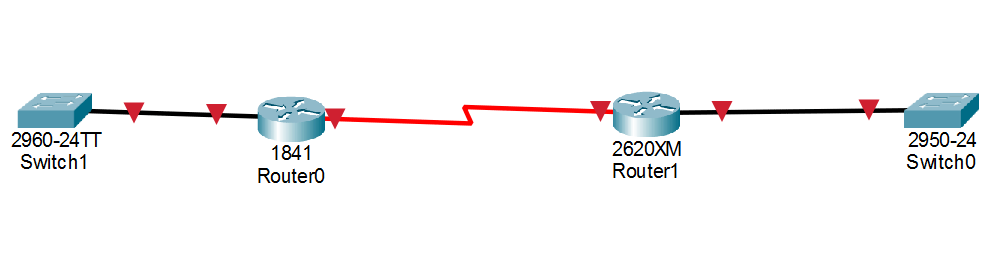
This lab is optional and required only if you want to practice this topic for any certification program. If you need only CDP commands and configurations, you can skip it. It includes two routers and two switches with the following connections.
Switch1(Port GigabitEthernet 1/1) is connected with Router0(Port FastEthernet 0/0).
Router0(Port serial 0/0/0) is connected with Router1(Port serial 0/0).
Router1(Port FastEthernet 0/0) is connected with Switch0(Port FastEthernet 0/24).
CDP is enabled by default on all supporting devices. However, only active interfaces can exchange CDP messages. The default state of a router interface is down. You can change it from interface configuration mode using the no shutdown command. To verify this, run the show cdp neighbors command on Switch1 in Privileged Exec mode.

The show cdp neighbors command lists all devices from which the host device received CDP messages. The switch does not receive any CDP messages. The switch is connected to the router via the FastEthernet 0/0 port, which is administratively down by default. In the down state, it cannot send or receive CDP messages. This status can be verified by running the show ip interface brief command in Privileged Exec mode on Router0.

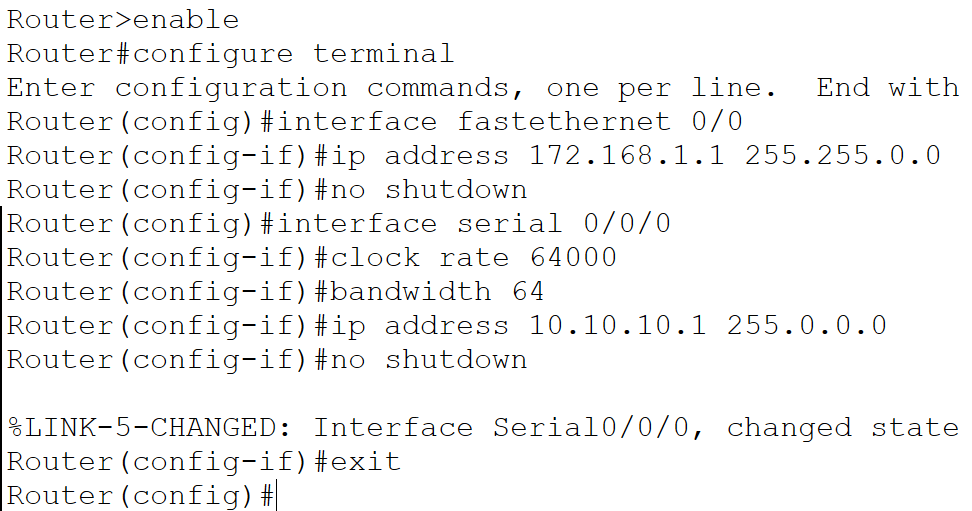
Assign IP addresses to FastEthernet0/0 and Serial0/0/0 of Router0, and enable them.
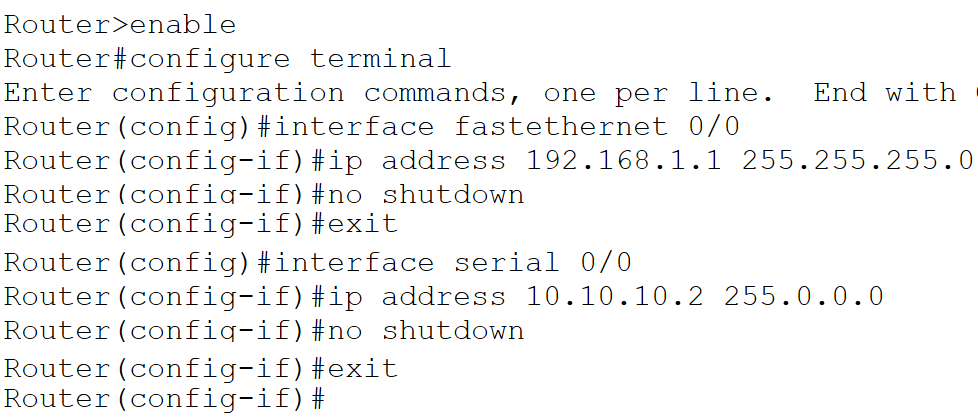
Similarly, assign an IP configuration to all used interfaces of Router1 and enable them.
The following link provides this lab with the above IP configurations.
Packet Tracer lab for CDP with IP configuration
CDP status
The output of the show cdp command provides information about the following:
- The status of the CDP (enabled/disabled)
- The hold time for CDP messages
- The time interval between CDP packets

The show cdp command shows information from Global configuration mode. To view interface-specific configuration, use the show cdp interface command.

How to show CDP neighbors
CDP information is stored locally and is not forwarded to neighboring devices. The CDP protocol collects device information, formats it into a Layer 2 frame, and multicasts it every 60 seconds. Supporting devices receive these frames and update their CDP tables accordingly. In this example, Router0 is directly connected to Router1 and Switch1. It can receive CDP messages only from these devices.

In the output of this command:-
Device ID:- Hostname of connected device. A MAC address here indicates that the device has not yet been assigned a name.
Local Interface:- The remote device is connected to this local port. This is a CDP message receiving port.
Holdtime:- How long this information is valid.
Capability:- S stands for switch, and R stands for Router. The top section of the output shows the capability codes.
Platform:- Hardware platform of the remote device.
Port ID:- The port on the local device that is connected to the remote device. The local device sends CDP messages from this port.
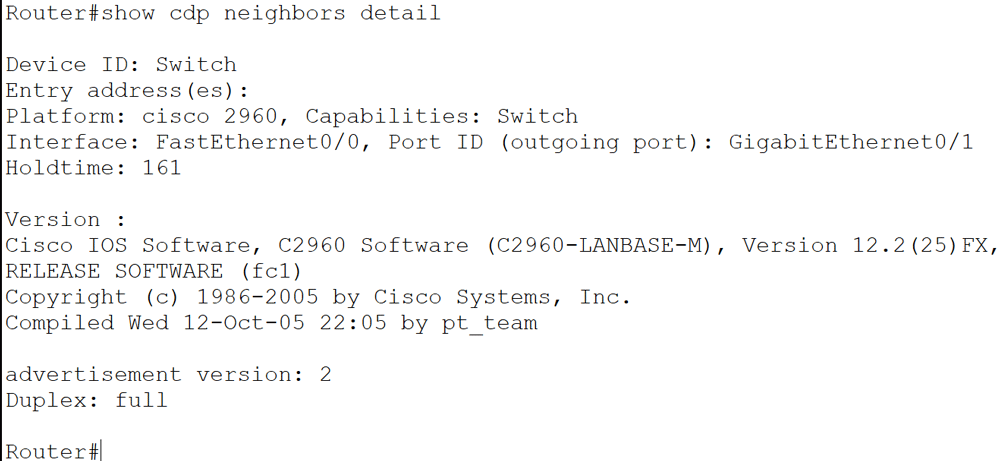
The show cdp neighbors command provides brief information about all connected devices. Use show cdp neighbors detail or show cdp entry * commands to display detailed information about connected devices.
The show cdp neighbor detail command
The show cdp entry * command
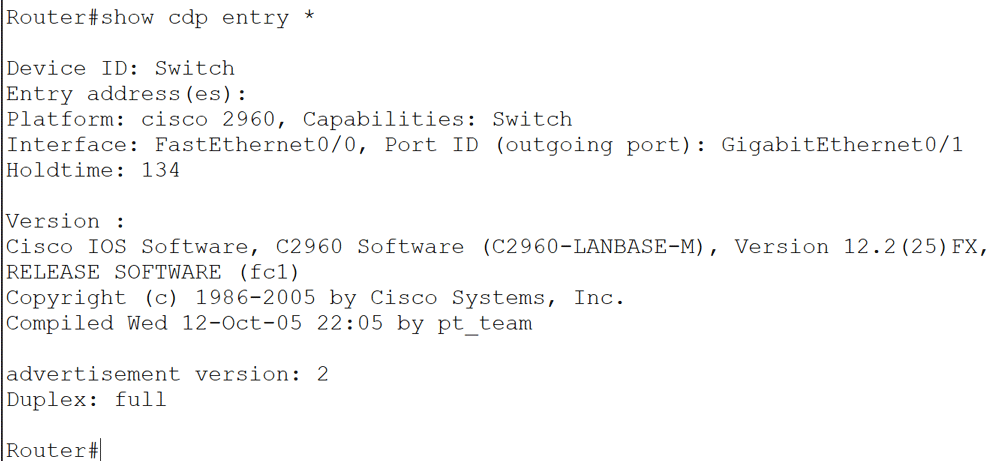
The show cdp neighbors detail and show cdp entry * commands display information about all connected devices. To get information about a specific device, use the show cdp entry [device name] command.

In the above output, the device name is Switch. It is a 2960 series switch running IOS 12.2(25), connected to the Router on GigabitEthernet0/1.
Disabling CDP
CDP is enabled by default on all supporting devices. Since it reveals confidential information about the device, you should disable it on an interface connected to a WAN link or an external device. The no cdp run command in Global configuration mode disables it globally. To disable it on a specific interface, use the no cdp enable command in its Interface configuration mode.

Enabling CDP
To enable it globally, use the cdp run command in Global configuration mode. To enable it on an interface basis, use the cdp enable command in its Interface configuration mode.

CDP commands cheat sheet
| Command | Description |
| Router#show cdp | Display globally configured CDP information, including timer. |
| Router# show cdp neighbors | Display brief information about directly connected devices. |
| Router#show cdp neighbors details | Display detailed information about directly connected devices. |
| Router#show cdp entry * | Same as show cdp neighbors command, display brief information about all directly connected devices. |
| Router# show cdp entry [device name] | Display information about a specific device. |
| Router#show cdp interface | Display information about CDP-enabled interfaces. |
| Router#show cdp traffic | Display CDP traffic information. |
| Router#clear cdp counters | Reset traffic counter to zero. |
| Router#clear cdp table | Clear CDP tables data. |
| Router(config)#cdp run | Enable CDP globally. |
| Router(config)#no cdp run | Disable CDP globally. |
| Router(config)#cdp holdtime x | Change hold time of CDP. |
| Router(config)#cdp timer x | Change how often CDP updates are sent. |
| Router(config-if)#cdp enable | Enable CDP on a specific interface. |
| Router(config-if)#no cdp enable | Disable CDP on a specific interface. |
Supported media type
CDP uses the Subnetwork Access Protocol (SNAP) frame type, which is not supported by all media types. Supported media types include Ethernet, Token Ring, Fiber Distributed Data Interface (FDDI), Asynchronous Transfer Mode (ATM), Point-to-Point Protocol (PPP), High-Level Data Link Control (HDLC), and Frame Relay. Consequently, CDP functionality is limited to these media types.
Conclusion
This tutorial provides a detailed explanation of CDP commands, including show cdp neighbor, cdp status, show cdp entry, no cdp run, and no cdp enable. By understanding and using these commands, you can efficiently troubleshoot connectivity issues, verify device configurations, and gather valuable network management information.
By ComputerNetworkingNotes Updated on 2026-01-20