Basic Concepts of an Ethernet Switch
A switch is a centralized networking device. It works in the middle of the network. It connects end devices to the network. End devices use frames to communicate. A frame is a small piece of data that two end devices exchange. Due to network bandwidth and many other factors, a device cannot send the entire data stream at once. It has to break the data stream into many small pieces. Each data piece is called a segment. The process of breaking a data stream into segments is called segmentation. After segmentation, the device attaches the necessary information to each segment. This information includes the source and destination addresses, along with other protocol-specific details.
There are two types of addresses: software addresses and Hardware addresses. The device needs to attach both types of addresses to each segment. It first adds software addresses. Software addresses are known IP addresses. They are used to identify devices. A segment with IP addresses is called a packet. After adding the software addresses, the device attaches the Hardware addresses. Hardware addresses are known as MAC addresses. A packet with MAC addresses is called a frame. An Ethernet switch understands and processes data only in the frame format. It cannot convert it into any higher-level format, such as packets or segments.

This tutorial is also available in video format on our YouTube channel. To watch the video version of it, use the following link.
https://www.youtube.com/watch?v=lcZmTVDus3Y
Basic concepts and fundamentals
A switch has many ports. It forwards an incoming frame only from the Port connected to the destination device. To know the connected and make forwarding decisions, it learns and saves the MAC addresses of all connected devices. This process goes through three phases: Learning, Decision making, and Forwarding.
Learning
When a switch receives a frame, it reads its source and destination MAC addresses. It uses the source address to learn about the connected device. It uses the destination address to make a forwarding decision. It stores source addresses in a table called the CAM table. The CAM table has many fields. Three essential fields are MAC address, Port, and Aging.
The MAC address field stores the frame's source MAC address.
In the Port field, it adds the port through which the switch received the frame.
In the Aging field, it saves time til this entry remains valid. If the switch does not receive another frame from the same source on the same port within this time, it removes this entry. This feature is called Aging.
Once the CAM table is full, the switch has no place to store any new addresses. Aging resolves this issue by automatically removing the old entries from the CAM table. It keeps the MAC addresses of only active devices. When a switch receives a frame, it looks up the frame's source address in the CAM table. If it finds an entry for the source address, it resets the timer stored in the Aging field. If it does not find an entry, it adds a new entry for the source address.

There is one more possible situation. If the switch finds an entry for the source MAC address with the different port information, it assumes that the device has been relocated.
Example
Suppose you connect a PC to a switch on its Port 1. The PC sends a frame to a device connected to the switch on another port. Since the CAM table has no entry for PC's MAC address, the switch adds a new entry for it.
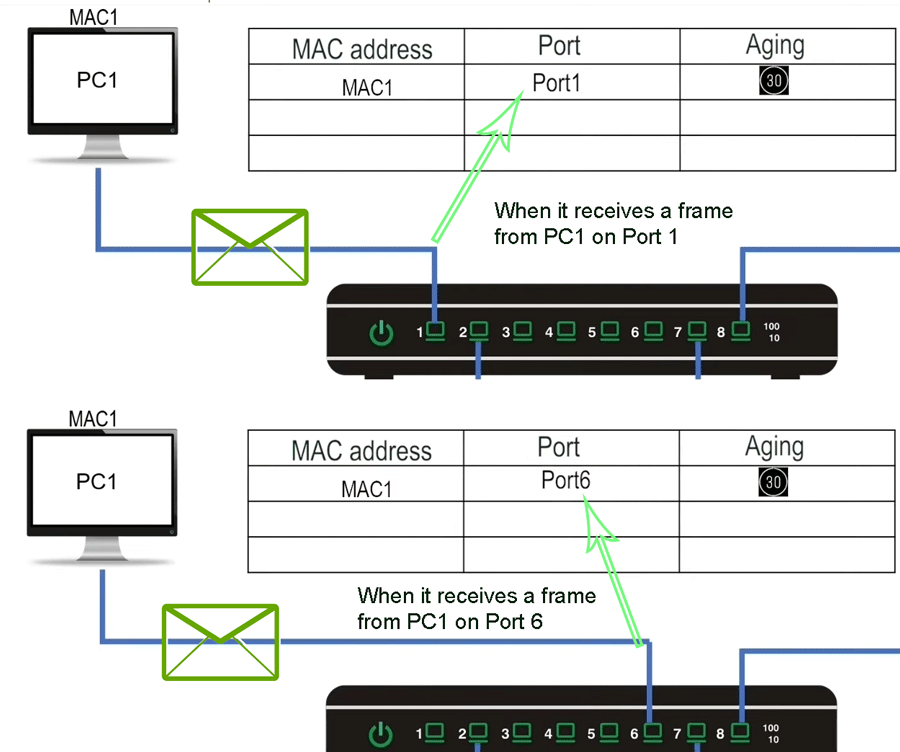
Now, suppose you move the PC from Port 1 to Port 6. The PC sends another frame. The frame reaches the switch on Port 6. The switch finds the PC's MAC address in the CAM table. However, it is associated with Port 1. In this situation, the switch assumes the device connected to Port 1 has been relocated to Port 6. It updates the port information along with the timer. If you move the PC back to Port 1, the switch updates the associated Port in the CAM table again. This feature makes device relocation completely hassle-free.
Decision making
A switch finds the destination MAC address of the incoming frame in the CAM table. If the CAM table has an entry for the destination MAC address, it selects the port mentioned in the entry to forward the frame. If the CAM table has no entry for the destination MAC address, it selects all ports except the Port on which it came to forward the frame. The process of forwarding a frame from all ports except the Port on which it arrived is called frame flooding.
A switch floods a frame if the destination address field contains an unknown unicast, a multicast, or a broadcast address.
An unknown unicast address is an address that is not present in the CAM table.
A multicast address belongs to a group of devices.
A broadcast address represents all devices on the local network.
Multicast and broadcast are destination-only addresses. These addresses are never used in the source address field of a frame. Since these addresses are never used in the source address field of a frame, and a switch uses the frame source address field to learn the addresses, a switch never learns about these addresses. These addresses always remain unknown to the switch. A switch always floods a frame with an unknown destination address. As a result, a frame having an unknown unicast, multicast, or broadcast address in the destination address is constantly flooded by the switch.
Example

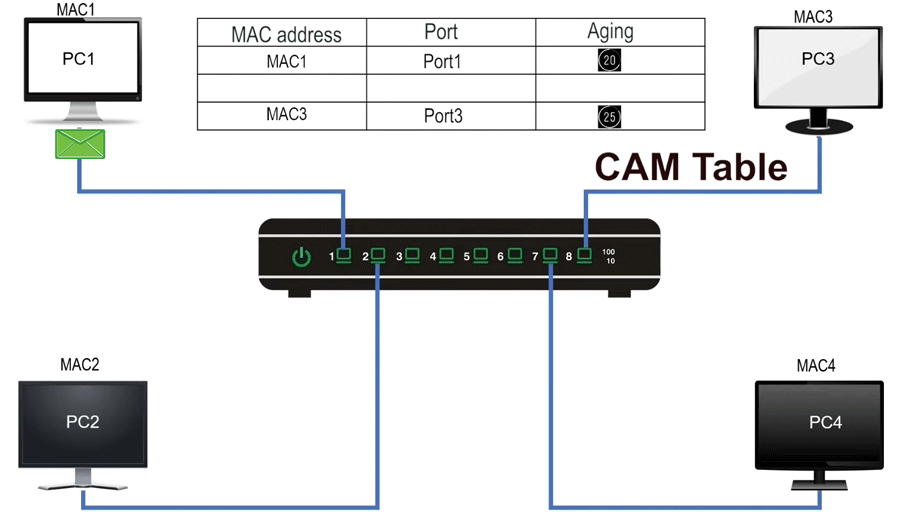
PC1 sends a unicast frame to PC3. The frame reaches the switch on Port 1. The switch reads the destination address field of the frame to make a forwarding decision. This frame has PC3's MAC address in the destination address field. Since PC3's MAC address is not available in the CAM table. The switch decides to flood the frame. After making the forwarding decision, it adds the frame’s source address to the CAM table and then forwards the frame from selected ports.

A switch reads the frame's destination address before the source address. It first makes a forwarding decision based on the destination address, then updates the CAM table based on the source address.
The frame reaches PC3. PC3 replies with its frame. The frame reaches switch on Port 3. The switch reads the frame's destination address and looks it up in the CAM table to make a forwarding decision. The frame has PC1's MAC address in its destination address field. This address is available in the CAM table. The switch decides to forward the frame from Port 1. After making the forwarding decision, the switch reads the source address field to update the CAM table. The source address field contains PC3's Mac address. This address is not available in the CAM table. The switch adds a new entry to the table. The switch forwards the frame from Port 1. The frame reaches PC1.
Forwarding
A switching method explains how a switch starts the forwarding phase. There are three switching methods: store-and-forward, fragment-free, and cut-through.
Store-and-forward
In the store-and-forward method, the switch waits till all fields of the frame are received. After receiving all fields of the frame, the switch verifies whether the received frame is error-free. If the received frame is error-free, the switch forwards the frame from the selected port or ports. If the received frame contains errors, the switch discards the frame. To know the condition of a frame, the switch uses the FCS field of the frame. The FCS field contains a CRC value. The CRC value allows a receiving device to determine whether the frame is identical to the source that packed it or has been damaged or tampered with in transit. After creating a frame, the source device runs the CRC algorithm. The value produced by this algorithm is known as the CRC value. It stores the CRC value in the frame's FCS field. The destination device runs the same CRC algorithm on the frame and compares the result with the CRC value stored in the FCS field. If the CRC values match, the frame is considered error-free. If they are not the same, the frame is considered the damaged frame.
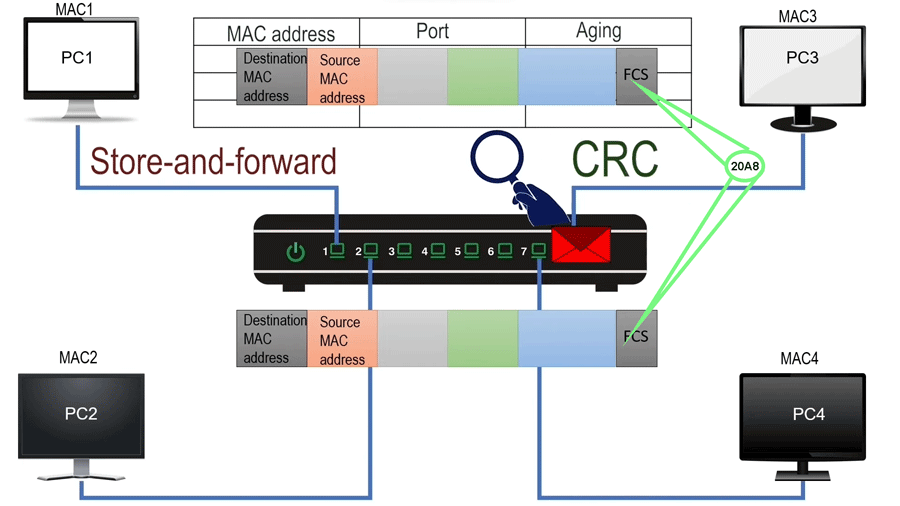
In the Store-and-forward switching method, a switch forwards only error-free frames. To determine the state of a frame, it pulls the entire frame, runs the CRC algorithm, and compares the result with the value stored in the FCS field. It forwards the frame only if both results match. This method provides the highest level of accuracy but at the cost of speed.
Cut-and-through
In the cut-through method, the switch starts forwarding as soon as the forwarding port is determined. An Ethernet frame stores the destination MAC address in the first field. To forward a frame, a switch only needs the frame's destination address. Since the destination address occurs very early in the Ethernet frame, a switch can start forwarding the received bits before receiving all of them. In this method, the switch does not check the frame's condition before forwarding it. It reduces latency but also propagates errors. It provides speed at the cost of forwarding some frames that contain errors.

Fragement-free
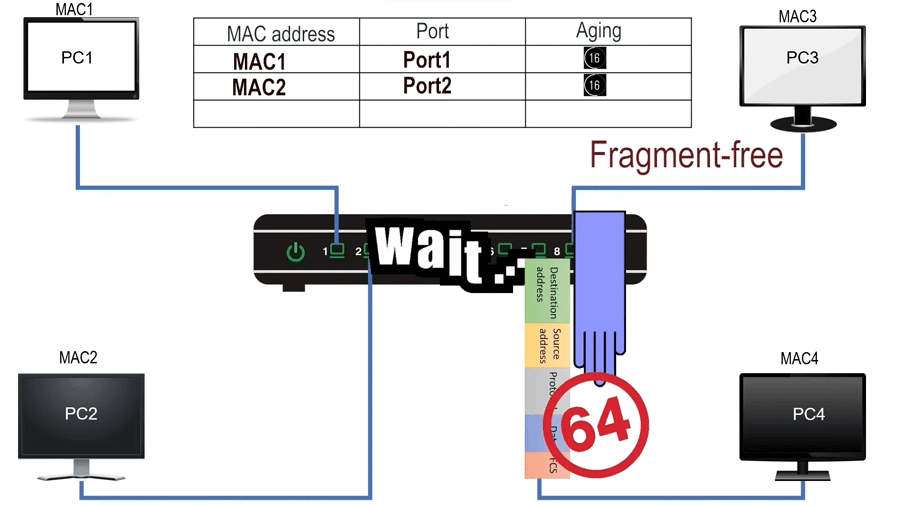
In the fragment-free method, after determining the forwarding port, the switch waits till the first 64 bytes of the frame are received. The 64 bytes is the minimum legal size of an Ethernet frame. An Ethernet frame that is shorter than 64 bytes is called a runt frame. A runt frame is a corrupt frame. It forwards only non-runt frames. It offers moderate speed and accuracy.
Conclusion
Ethernet switches are foundational devices in modern networking. They enable efficient and reliable communication between devices. By learning MAC addresses and making intelligent forwarding decisions, switches help minimize unnecessary network traffic and optimize performance. Understanding switching methods (store-and-forward, cut-through, and fragment-free) allows you to balance speed and accuracy based on network needs. With these core concepts, you can manage Ethernet switches more effectively in your network.
Author Laxmi Goswami Updated on 2025-12-20