Access Points in Computer Networks Explained
An access point is a networking device that extends a wired network to wireless-capable devices. It enables wireless devices such as smartphones, tablets, and laptops to connect to a wired network via Wi-Fi. This tutorial explains how an access point works and its roles and functions in a computer network.
How does an access point work?
An access point has Ethernet ports and one or a few antennas. It connects to the wired network using the Ethernet port. It receives data from the wired network, converts it into radio signals, and broadcasts it over one or more radio bands such as 2.4 GHz and 5 GHz. Any wireless device within the range can access these signals after authentication. The access point handles authentication. After authentication, the wireless device can communicate with the wired network. The access point converts signals for it. It receives data from the wireless device, converts it into electric signals, and transmits it to the wired network.
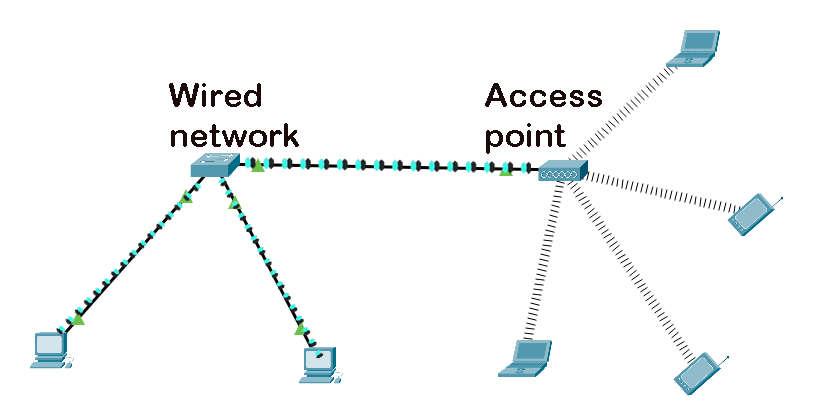
- You connect an access point to a wired network and configure a password, an access point ID, and radio frequency bands.
- The access point broadcasts its ID. Any wireless device within the range can see this ID. If it wants to connect to the access point, it needs to authenticate itself by entering the password configured on the access point.
- After authentication, the wireless device connects to the wired network.
- In a wired network, data travels in electrical form. A wireless device uses radio signals to send and receive data. The access point understands both.
- It receives data in electrical form from the wired network, converts it into radio signals, and broadcasts them on the configured radio frequency bands.
- The wireless device receives radio signals and converts them into data.
- If the wireless device replies, it converts data into radio signals and broadcasts them on the configured radio frequency band.
- The access point continuously listens to the configured band. It receives the radio signals the wireless device broadcasts.
- The access point converts radio signals into digital signals and sends them to the connected wired network.
- This way, the access point enables communication between the wired network and the wireless device.
Advantages/benefits of an access point
- It expands network connectivity. You can use it in areas where cabling is complex or not possible.
- It enables roaming. Since it uses radio signals for data transmission, you can use your wireless device from anywhere within the range. You can also roam around with your wireless device within the range without losing connectivity.
- It increases productivity. You can connect and use non-standard devices within the network. For example, many devices such as smartphones do not have Ethernet ports. However, they have Wi-Fi. You can connect them to the access point. The access point allows you to use them as network devices.
- It provides flexibility. Most ISPs use access points at customers' premises to provide internet connectivity. These access points allow users to connect to the Internet from anywhere within range with Wi-Fi-enabled devices, such as smartphones, smart TVs, tablets, and laptops.
- It reduces network costs. It does not need cables for connections. You can save all the money you spend on installing and managing cables.
Types of access points
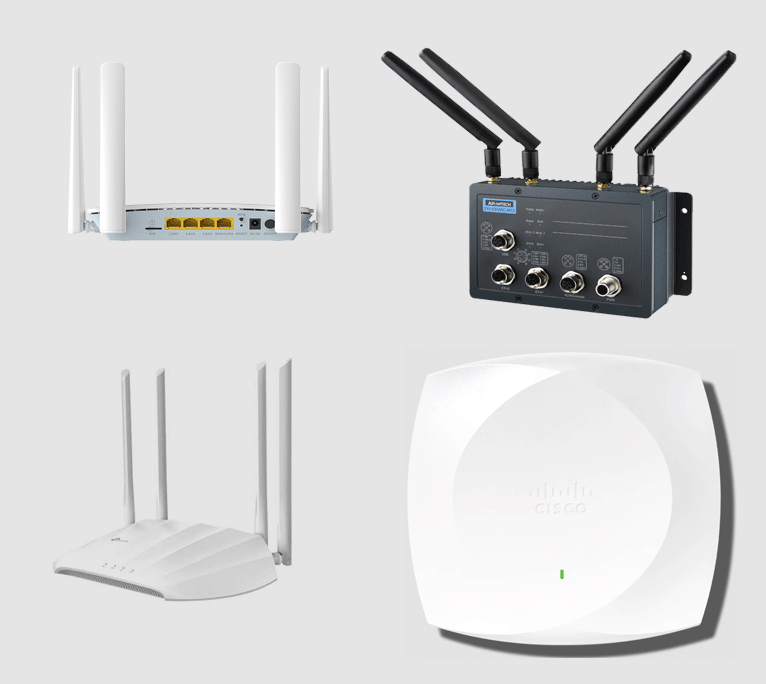
Depending on configuration and use, there are many types of access points. The following section explains the most common types of access points.
Indoor access points
Indoor access points are designed to provide connectivity inside a home, office, or a building. Radio signals inside premises face many hurdles, such as walls, furniture, and other appliances. To address these obstacles, indoor access points offer strong signal penetration. These access points usually have a small coverage area.
Outdoor access points
Outdoor access points have rugged outer casings to protect their internal components from extreme weather conditions, including rain, wind, heat, and cold. They also have powerful antennas to provide coverage in a large area.
Zero roaming access points
Zero roaming access points are optimized and designed to provide continuous connectivity. These access points are expensive. However, they provide nearly zero latency and packet loss during data transmission. These are mainly used in companies.
Backhaul access points
Backhaul access points extend a wired network where cabling is difficult or impossible. They are optimized to work as a wired swtich. They connect different network segments.
Industrial access points
Industrial access points are optimized and designed to operate in a high-EMI (Electromagnetic Interference) environment, such as warehouses and factories. They have built-in mechanisms to reduce signal interference.
Root access points
Root access points connect directly to a wired network. To provide coverage in a large area, you can connect multiple root access points to the same wired network. This setup lets users roam within the coverage area without losing connectivity.
Repeater access points
Repeater access points extend the range of root access points. They work in the middle of wireless devices and the root access points. They do not perform any authentication or provide functions other than boosting signals and forwarding data between wireless devices and root access points.
Bridge access points
Bridge access points connect two separate networks. You can configure an access point as a root or non-root access point. A bridge access point links to a non-root access point and passes traffic to the wired network over the wireless link.
Workgroup bridge access points
Workgroup bridge access points connect to other access points as clients and provide connectivity for devices connected to Ethernet ports.
Standalone access points
Standalone access points act as hubs or switches. They do not connect to any wired network. They are used to build a small wireless network.
This tutorial is part of the tutorial series 'Role and function of network components'. The other parts of this tutorial series are as follows.
Chapter 1.1.a Routers in Computer Networks Explained
Chapter 1.1.b Layer 2 and Layer 3 Switches Explained
Chapter 1.1.c Next-generation firewalls and IPS Explained
Chapter 1.1.d Access Points in Computer Networks Explained
Chapter 1.1.e Controllers in Computer Networks Explained
Chapter 1.1.f Endpoints in Computer Networks Explained
Chapter 1.1.g Servers in Computer Networks Explained
Chapter 1.1.h PoE in Computer Networks Explained
This tutorial series covers the following CCNA Exam v1.1 (CCNA 200-301) topics.
1.0 Network Fundamentals
- 1.1 Explain the role and function of network components
-
- 1.1.a Routers
- 1.1.b Layer 2 and Layer 3 switches
- 1.1.c Next-generation firewalls and IPS
- 1.1.d Access points
- 1.1.e Controllers
- 1.1.f Endpoints
- 1.1.g Servers
- 1.1.h PoE
Conclusion
Access points are essential networking devices in modern computer networks. In this tutorial, I explained what access points are, how they work, and the types of access points. Knowing these types helps you pick an access point that suits your network and infrastructure.
Author Laxmi Goswami Updated on 2026-07-29