2 Tier and 3 Tier Architecture in Networking
The terms 2-tier and 3-tier in computer networking refer to the layout you use to design your LAN topologies. When planning and designing your LAN network, you must consider the tier you want to choose. The required number of switches and Ethernet cable lengths depend on the tier you choose. This tutorial explains both tiers, how they function, and the type of devices needed to build and run the network.
Office or campus networks are not as simple as the network you build and use at home or in a lab. A home or a lab network contains some PCs and a few switches. You can plug PCs into any available switch port and connect switches arbitrarily. Since there are only a couple of devices, the effects of network design are negligible. An office or campus network may contain many hundreds or thousands of PCs. Due to security, stability, availability, speed, performance, and many other factors, you cannot connect PCs and switches arbitrarily. You must connect them in a way that meets office or campus objectives and requirements and follows the network standards. The tier concept defines this way. It defines the layout, required number of switches, and Ethernet standards for each link.
Types of switches
The tier concept classifies switches into three types: access, distribution, and core.
An access switch connects end devices to the network. It sits at the edge of the network. It receives traffic from end devices and forwards it to other connected devices based on their destination addresses. If the destination device is not directly connected to it, it forwards the traffic to the switch connected to it. That switch sends the traffic to that device. That switch is also called the access switch. In other words, a switch that receives traffic from end devices and sends traffic to end devices is called an access switch.
A distribution switch connects access switches. It exchanges traffic between access switches. It does not connect any end device directly.
A core switch connects distribution switches. It exchanges traffic between distribution switches. It does not connect access switches and end devices directly.
The flat or one-tier network
The flat or one-tier network contains only access switches. This type of network is commonly used in home or lab networks. It contains only a few switches and a small number of end devices. This design puts no restrictions on how you connect devices to the swtich. You can connect devices to any available switch ports. This layout is generally not used in office and campus networks.
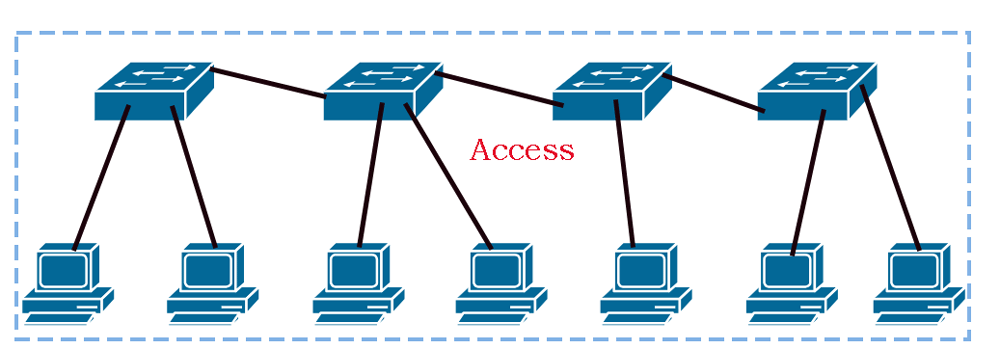
Key points:-
- All switches are access switches. End devices can connect to any switch.
- An access switch connects directly to another access switch.
- Security policies, firewall rules, and business logic are applied on access switches.
The two-tier network
It is also called a collapsed core layout. It contains access and distribution switches. It is commonly used in offices and small-sized campus networks. It contains many switches and several end devices. It categorizes the switches into two layers: access and distribution. The access switches connect end devices to the network. The distribution switches connect access switches.
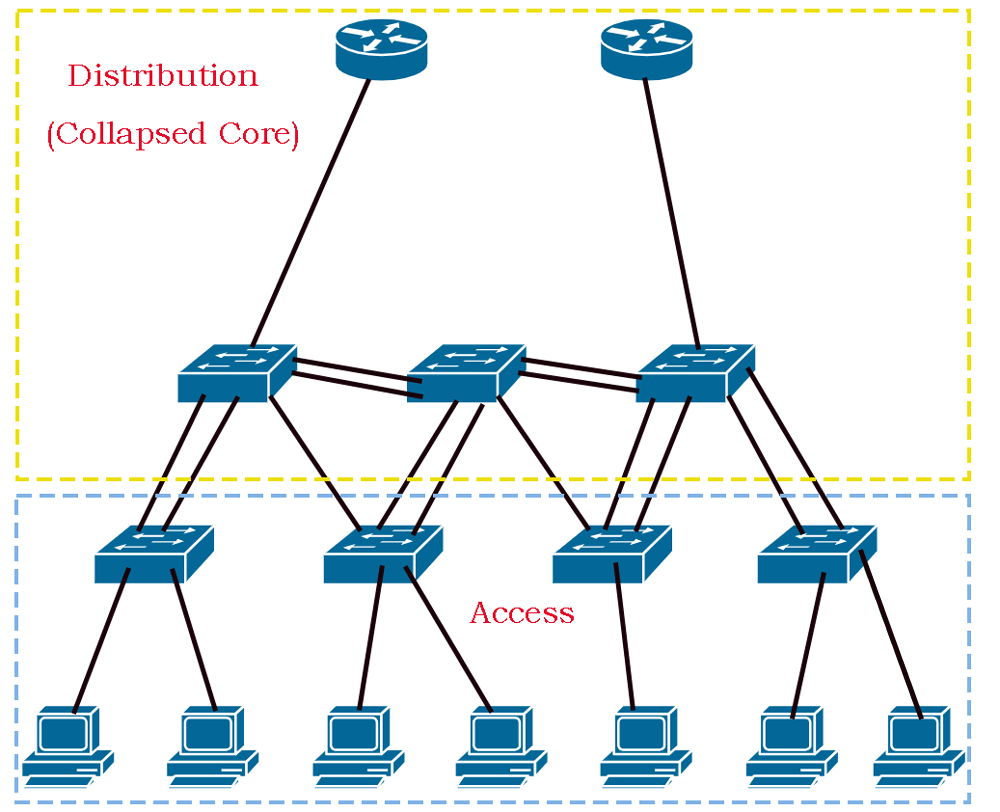
Key points:-
- End devices can connect only to the access switches. They cannot connect to the distribution switches.
- An access switch cannot connect directly to another access switch. It must connect through a distribution switch to another access switch.
- A distribution switch cannot connect to end devices. It can connect only to access switches.
- Each access switch must connect to at least one distribution switch.
- Security policies, firewall rules, and business logic are applied only on distribution switches.
- For redundancy and backup, multiple links are created between distribution and access switches.
The three-tier network
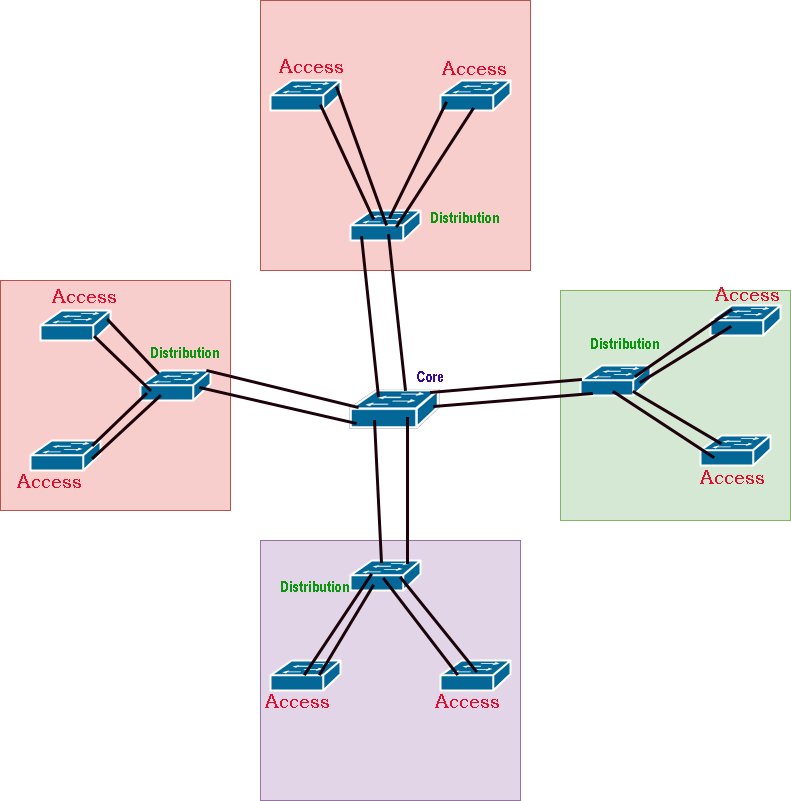
The three-tier network contains access, distribution, and core switches. This type of network is commonly used in big offices and large-sized campus networks. It contains hundreds of switches and thousands of end devices. It categorizes the switches into three layers: access, distribution, and core. The access switches connect end devices to the network. The distribution switches connect access switches. The core switches connect distribution switches.
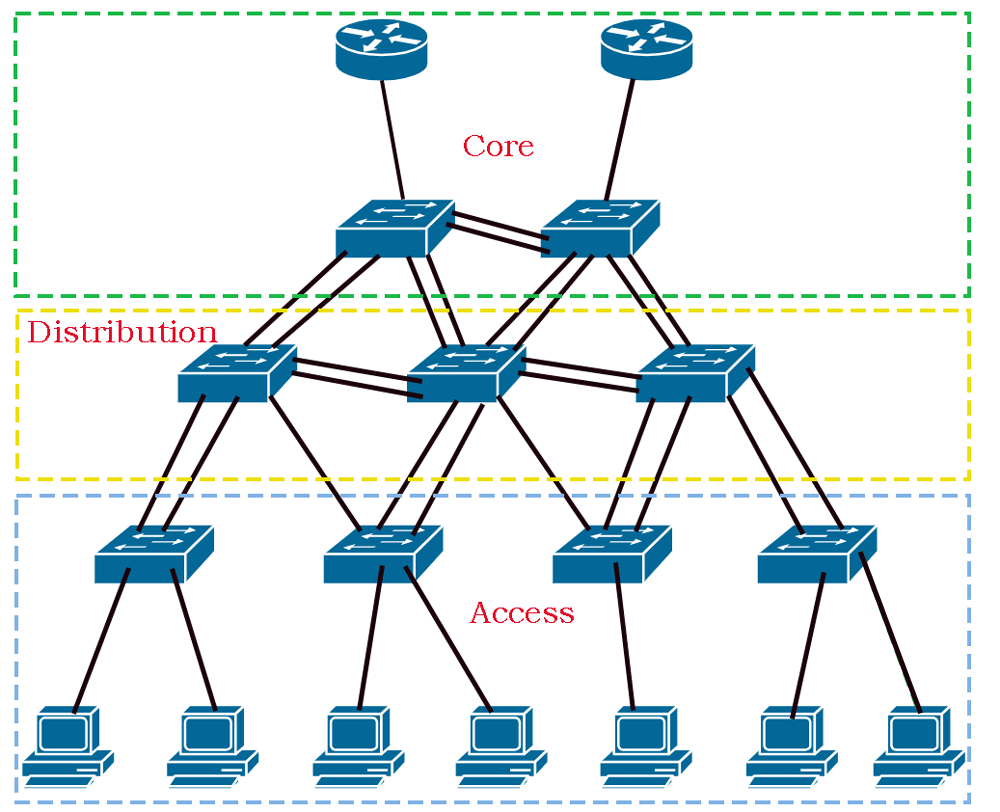
- End devices can connect only to the access switches. They cannot connect to the distribution and core switches.
- An access switch cannot connect directly to another access switch. It must connect through a distribution switch to another access switch.
- A distribution switch cannot connect to end devices. It can connect only to access and distribution switches.
- Each access switch must connect to at least one distribution switch.
- Each distribution switch must connect to at least one core switch.
- Core switches connect distribution switches.
- Distribution switches can also have direct connections.
- For redundancy and backup, multiple links are created between core and distribution switches.
- Security policies, firewall rules, and business logic are applied only on distribution switches.
Why do you use core switches?
If you compare the key points of tier two and tier three, they are almost identical. In addition, the core layer is also not compulsory. You can connect distribution switches directly. With all these parameters, you may think why one should use the core switches. The reason behind using core switches is that they reduce the required switch ports and Ethernet cables you need to connect distribution switches.
Let’s take an example. A network contains 4 distribution switches. To connect these switches with a backup link, you need 6 switch ports (4 x 3/2 = 6) on each switch. You need 12 Ethernet cables (4 x 3 = 12) to connect these switches.
The formula to calculate the required number of switch ports on each switch is N x (N-1) / 2. To calculate the required number of cables, use N x (N-1). In both formulas, N is the total number of switches.
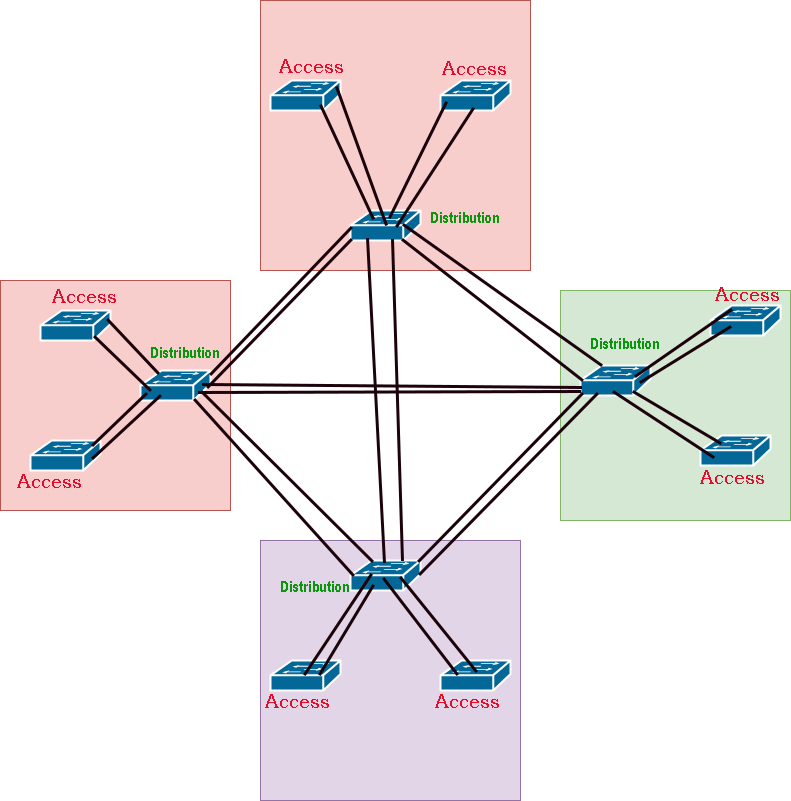
A core switch drastically reduces this requirement. If you place a core switch between these switches, you need only 2 ports on each switch. The required number of Ethernet cables also reduces from 12 to 8. You can use core switches to reduce the required number of switch ports and Ethernet cables to connect distribution switches.
This tutorial is part of the tutorial series 'Describe characteristics of network topology architectures'. The other parts of this tutorial series are as follows.
Chapter 1.2.a & b 2 Tier and 3 Tier Architecture in Networking
Chapter 1.2.c Spine-Leaf Architecture in Computer Networking
Chapter 1.2.d Wide Area Network (WAN) Explained
Chapter 1.2.e Small Office / Home Office Architectures Explained
Chapter 1.2.f On-premises and Cloud Explained
This tutorial series covers the following CCNA Exam v1.1 (CCNA 200-301) topics.
1.0 Network Fundamentals
- 1.2 Describe characteristics of network topology architectures
-
- 1.2.a Two-tier
- 1.2.b Three-tier
- 1.2.c Spine-leaf
- 1.2.d WAN
- 1.2.e Small office/home office (SOHO)
- 1.2.f On-premises and cloud
Conclusion
There are three types of switches: access, distribution, and core. This classification is purely based on whether the switch forwards traffic between end devices or other LAN switches. If a switch forwards traffic between end devices, it is an access switch. If a switch forwards traffic between access switches, it is a distribution switch. If a switch forwards traffic between distribution switches, it is a core switch. The tier or layer concept defines the type of switches it uses. If a network uses only access switches, it is a flat or tier one network. If a network uses access and distribution switches, it is a two-tier network. If a network uses access, distribution, and core switches, it is a three-tier network.
Author Laxmi Goswami Updated on 2026-08-10