How to configure a secondary or slave authoritative name server
There are two types of authoritative name servers: primary or master and secondary or slave. A primary or master name server resolves queries for configured zones. A secondary or slave name server works as a backup name server. It resolves queries when the primary or master authoritative name server is down.
LAB set up
We will use the following lab to configure, test, and verify a secondary or slave authoritative name server.

To learn how to set up this lab on virtual or physical systems, please check the previous tutorials of this tutorial series.
This tutorial is part of the following tutorial series on DNS server concepts and configurations.
Chapter 01 How to configure DNS Server in Linux
Chapter 02 DNS Basic Concepts, Fundamentals, and Terminology
Chapter 03 DNS Server and Query Types Explained
Chapter 04 The /etc/hosts, /etc/resolv.conf, and /etc/nsswitch.conf files
Chapter 05 The dig command on Linux
Chapter 06 The nslookup command on Linux
Chapter 07 Change or specify the DNS server to the nslookup command
Chapter 08 DNS zone File Format
Chapter 09 The TTL and ORIGIN directives in the zone file
Chapter 10 Types of resources records in zone files
Chapter 11 The SOA Record Explained in the DNS zone file
Chapter 12 The NS Record, Glue record, and Lame Delegation
Chapter 13 The MX record in a zone file explained
Chapter 14 The a, aaaa, and cname DNS record types
Chapter 15 The pointer (PTR) record and Reverse mapping Explained
Chapter 16 How to configure a caching-only name server
Chapter 17 How to configure DNS Forwarding and a forwarder name server
Chapter 18 How to configure a primary or master authoritative name server
Chapter 19 How to configure a secondary or slave authoritative name server
Chapter 20 How to configure reverse mapping on DNS name servers
Configuring the primary name server to allow a zone transfer
Authoritative name servers use zone files to resolve DNS queries. Zone files are created only on primary name servers. Secondary or slave name servers receive them from the primary name servers in a process called a zone transfer.
By default, primary name servers do not allow zone transfers. We need to manually configure each zone which zone file we want the name server to transfer to the slave name servers. To allow a zone transfer to DNS clients, we need to configure the allow-transfer option in the zone configuration.
In our lab, we configured the primary authoritative name server on RHELServer1. On this system, open the /etc/named.conf file and add RHELServer2's IP address to this option in the example.com zone.
zone "example.com"{
	type master;
	file "example.com.db";
	allow-transfer {192.168.29.101;};
};
The above configuration instructs this server to transfer the zone data file to 192.168.29.101 (slave name server).

Restart the named service.

Configuring the secondary or slave authoritative name server
On the RHELServer2 system, install the bind and bind-utils packages and open the /etc/named.conf file. Add RHELServer2's IP address in the listen-on port 53 option and the network address in the allow-query option.
These options configure the name server to listen and answer DNS queries from the network 192.168.29.0/24 on the IP address 192.168.29.101.
Add a zone configuration for the example.com domain. In this configuration, configure three options: type, file, and masters.
The type option defines the role of this server for this zone. To configure this server as the secondary or slave name server for this zone, we use the value slave here.
The file option defines the zone file's name. The slave name server uses this file to answer DNS queries that belong to this domain when the master name server is not available. We don't create zone files on slave name servers. Slave name servers automatically fetch them from the primary name servers and save them in the /var/named/slaves directory.
The masters option defines the primary or master name servers' IP addresses. The slave name server automatically fetches zone files from the name servers specified in this option.
Add the following zone configuration.
zone "example.com"{
	type slave;
	file "slaves/example.com.db";
	masters {192.168.29.100;};
};
The above configuration configures this server as an authoritative slave name server for the example.com zone. To resolve queries for this zone, it reads the /var/named/slaves/example.com.db file.
The following image shows the configured /etc/named.conf file on the slave name server.

Restart the named service and check the /var/named/slaves directory to verifies the slave server fetches the zone file from the primary name server.

Adding the firewall rule for the DNS service
By default, the firewall does not allow DNS queries from other systems. That means the firewall will drop all incoming DNS queries from DNS client systems. The following commands display the default zone and add an allow rule for the DNS traffic.
#firewall-cmd --get-default-zone
#firewall-cmd --zone=public --add-service=dns

The firewall will flush this rule when you exit the current session. To add this rule permanently, use the --permanent option. The following command adds this rule permanently.
#firewall-cmd --zone=public --add-service=dns --permanent
Configuring DNS clients
A DNS client first sends DNS queries to the primary name server. If the primary name server is down, it sends queries to the secondary or slave name server.
Edit the IP configuration on RHELClient and add the slave name server's IP address.

Restart the connection and verify the secondary name server's IP address.

Testing and verifying the slave authoritative name server
A slave name server resolves DNS queries when the master name server is down. To verify it, first translate the name pc1.example.com from the client system.

As we can see in the above image, the query has been resolved by the primary name server.
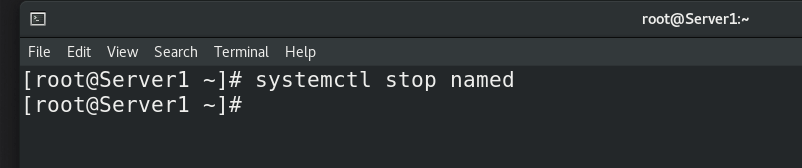
Now, let us stop the DNS service on the primary name server.
Now, test again.

As we can see in the above output, this time, the slave name server resolved the query. It verifies the following.
- If the primary name server is up, it resolves queries.
- If the primary name server is not available, the secondary name server resolves queries.
Conclusion
A secondary or slave name server translates names when the primary server is down. It automatically downloads zone files from the master name server in the zone transfer process and uses them to resolve DNS queries in the absence of the primary name server.
By ComputerNetworkingNotes Updated on 2026-06-07