SELinux Booleans Explained with Examples
SELinux uses Booleans to determine whether to allow or deny an action. Booleans work like on/off switches. We can turn them on and off as per our requirements. If a Boolean is on, SELinux allows the action specified by it. If it is off, SELinux denies the related task.
Listing all Booleans
SELinux saves Booleans in files. It uses a separate file for each Boolean. The filenames match the Boolean names. It places all Boolean files in the /sys/fs/selinux/booleans directory. We can list this directory to view all Booleans.
#ls /sys/fs/selinux/booleans

On a typical server, the output of the above command may include hundreds of Boolean files. In that case, you can redirect the above output to the grep command and narrow down the Booleans related to a particular service or thing. For example, you can view all Booleans related to the FTP service using the following command.
#ls /sys/fs/selinux/booleans | grep ftp

You can check manual pages to know what a particular Boolean does and how it works. The -K option with the man command shows the manual pages for the specified Boolean. For example, the following command shows manual pages for the ftpd_anon_write Boolean.
#man -K ftpd_anon_write
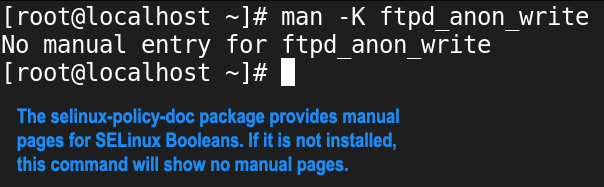
If the above command shows no manual pages, you must install the selinux-policy-doc package. This package provides manual pages for SELinux Booleans. It is not part of the default installation. You can install it using the following command.
#dnf install selinux-policy-doc

After installing the selinux-policy-doc package, you can check Boolean manual pages using the following command.
#man -K [Boolean name]

Viewing Boolean status
A Boolean status shows whether the Boolean is active. We have two commands to view the status of all of them.
#getsebool -a
#sestatus -b

By default, both commands show the status of all Booleans. To view the status of a specific Boolean, we can filter the output with the grep command. For example, we can use any one command from the following command to view the status of the ftpd_anon_write Boolean.
#getsebool -a | grep ftpd_anon_write
#sestatus -b | grep ftpd_anon_write

The getsebool also accepts the Boolean name as the argument. We can use it to view the status of a single Boolean. For example, we can use the following command to the status of the ftpd_anon_write Boolean.
#getsebool ftpd_anon_write

Changing Booleans
We can change a Boolean status temporarily and permanently. If we change it temporarily, SELinux will restore its original value during the next reboot. If we change it permanently, SELinux uses the new value until we change it again. A temporary change is generally used for testing and troubleshooting SELinux Booleans. For example, if a Boolean in its default state blocks a specific action and we want to allow it for testing or troubleshooting, we can change its state temporarily. After testing, we can revert it to its original state. A permanent change is usually used to create SELinux policies. For example, if we want to allow a particular action, we can permanently activate or deactivate the corresponding Boolean.
The setsebool command changes the specified Boolean's status. It uses the following syntax.
#setsebool [Boolean name] [new status]
A Boolean status can be either on or off. We can specify the new status using on and off keywords or the values 0 and 1. The value 0 sets it off, and the value 1 turns it on. For example, to enable the ftpd_anon_write Boolean, we can use any on command from the following.
#setsebool ftpd_anon_write 1
#setsebool ftpd_anon_write on
To verify the new status, we can use the getsebool command.
#getsebool ftpd_anon_write

This command changes the Boolean status only in the current session. To verify this, restart the system and recheck the Boolean status.
#reboot -f
#getsebool ftpd_anon_write

The -P option makes this change permanent. Use this option with the setsebool command to change the Boolean status permanently. For example, the following command changes the status of the ftpd_anon_write to on permanently.
#setsebool -P ftpd_anon_write 1
Restart the system and check the status of this Boolean to verify this.
#getsebool ftpd_anon_write
#reboot -f
#getsebool ftpd_anon_write

This tutorial is part of the tutorial " SELinux Explained with Examples.". Other parts of this tutorial are as follows:
Chapter 1 Basic concepts and fundamentals of SELinux
Chapter 2 SELinux and AppArmor Differences and Terminology
Chapter 3 SELinux Modes Explained with Examples
Chapter 4 SELinux Contexts for Users, Processes, and Files
Chapter 5 Copying, Moving, and Archiving Files with SELinux Contexts
Chapter 6 SELinux Explained with Examples in Easy Language
Chapter 7 SELinux Booleans Explained with Examples
Chapter 8 Troubleshooting SELinux explained with Booleans
Conclusion
SELinux Booleans defines and controls the allowed actions. It has only two values: on and off. The on value allows the specified action. The off value denies users from performing the task the Boolean represents. This tutorial explained how to view and change Boolean status temporarily and permanently.
Author Laxmi Goswami Updated on 2026-02-09