EX200 Exam Objectives and Study Guide
EX200 (Red Hat Certified System Administrator) is a performance-based exam. It tests the knowledge and skills you need to deploy, configure, and manage Red Hat Linux and its related products in a wide range of environments. The skills tested in this exam are the foundation for system administration across all Red Hat products. This article lists the exam topics covered and tested in this exam and links each objective with the study material you need to learn that topic.
We continuously update the linked resources to provide the most accurate and valuable study material for the EX200 (RHCSA) exam. If a link for any objective is not available right now, we are either preparing a new tutorial or updating an existing one. Please check this page again after a few days.
Prerequisites for this exam:-
You must have passed either the RH124 and RH134 exams or the RH199 exam before enrolling in this exam.
EX200 Red Hat Certified System Administrator (RHCSA) Exam Topics and Study Guide
- Understand and use essential tools
- Access a shell prompt and issue commands with correct syntax
- Use input-output redirection (>, >>, |, 2>, etc.)
- Use grep and regular expressions to analyze text
- Access remote systems using SSH
- Log in and switch users in multi-user targets
- Archive, compress, unpack, and uncompress files using tar, gzip, and bzip2
- Create and edit text files
- Create, delete, copy, and move files and directories
- Create hard and soft links
- List, set, and change standard ugo/rwx permissions
- Locate, read, and use system documentation including man, info, and files in /usr/share/doc
- Manage software
- Configure access to RPM repositories
- Install and remove RPM software packages
- Configure access to Flatpak repositories
- Install and remove Flatpak software packages
- Create simple shell scripts
- Conditionally execute code (use of: if, test, [], etc.)
- Use Looping constructs (for, etc.) to process file, command line input
- Process script inputs ($1, $2, etc.)
- Processing output of shell commands within a script
- Operate running systems
- Boot, reboot, and shut down a system normally
- Boot systems into different targets manually
- Interrupt the boot process in order to gain access to a system
- Identify CPU/memory intensive processes and kill processes
- Adjust process scheduling
- Manage tuning profiles
- Locate and interpret system log files and journals
- Preserve system journals
- Start, stop, and check the status of network services
- Securely transfer files between systems
- Configure local storage
- List, create, and delete partitions on GPT disks
- Create and remove physical volumes
- Assign physical volumes to volume groups
- Create and delete logical volumes
- Configure systems to mount file systems at boot by universally unique ID (UUID) or label
- Add new partitions and logical volumes, and swap to a system non-destructively
- Create and configure file systems
- Create, mount, unmount, and use VFAT, ext4, and XFS file systems
- Mount and unmount network file systems using NFS
- Configure autofs
- Extend existing logical volumes
- Diagnose and correct file permission problems
- Deploy, configure, and maintain systems
- Schedule tasks using at, cron and systemd timer units
- Start and stop services and configure services to start automatically at boot
- Configure systems to boot into a specific target automatically
- Configure time service clients
- Install and update software packages from Red Hat Content Delivery Network, a remote repository, or from the local file system
- Modify the system bootloader
- Manage basic networking
- Configure IPv4 and IPv6 addresses
- Configure hostname resolution
- Configure network services to start automatically at boot
- Restrict network access using firewalld and firewall-cmd
- Manage users and groups
- Create, delete, and modify local user accounts
- Change passwords and adjust password aging for local user accounts
- Create, delete, and modify local groups and group memberships
- Configure privileged access
- Manage security
- Configure firewall settings using firewall-cmd/firewalld
- Manage default file permissions
- Configure key-based authentication for SSH
- Set enforcing and permissive modes for SELinux
- List and identify SELinux file and process context
- Restore default file contexts
- Manage SELinux port labels
- Use Boolean settings to modify system SELinux settings
Certification path
After passing the EX200 exam, if you want to continue on the same track, you can take the EX294 exam. RH294 exam is the next step in the certification path.
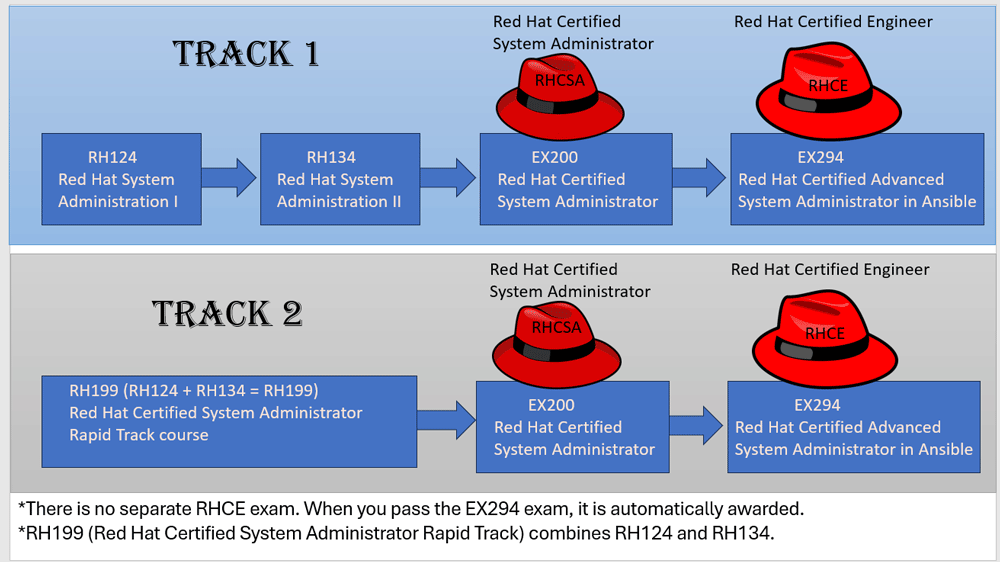
RH124 Exam Objectives and Study Guide
RH134 Exam Objectives and Study Guide
EX200 (RHCSA) Exam Objectives and Study Guide
EX294 (RHCE) Exam Objectives and Study Guide
Red Hat may change the exam objectives at any time without any prior notification. If you plan to take this exam, check the following official webpage for any changes or updates to the listed objectives.
https://www.redhat.com/en/services/training/ex200-red-hat-certified-system-administrator-rhcsa-exam
Conclusion
RHCSA is one of the most popular Linux certification programs. Unlike other certification exams, it includes no objectives or multiple-choice questions. All questions in this exam are performance-based. You must complete all tasks given to pass this exam. Since it is a 100% practical exam, you must practice all exam topics and gain mastery of them before taking this exam. This article helps you achieve this. It lists all exam objectives and provides study materials for each one.
Author Laxmi Goswami Updated on 2026-09-10