What is RHEL Linux?
Linux is an open-source technology. You can use it in any manner for any purpose. Most commonly, it is used to build an operating system for personal computers and server systems that control multiple network computers and allow them to access services running on them. It can also run devices (such as routers, mobiles, security devices, machines, vehicles, and so on) that need an operating system to function. For example, Android, the OS that runs smartphones, is built upon Linux. Cisco IOS, an operating system that runs Cisco devices, is also built upon Linux. This tutorial explains what Linux is and how it works.
RH124 exam topic covered in this tutorial
Introduction to Red Hat Enterprise Linux
Define and explain the following concepts: open source, Linux, Linux distributions, and Red Hat Enterprise Linux.
Key components of a system
A system has four components: applications, an OS, a kernel, and hardware resources.
Applications are productive software such as LibreOffice, GIMP, VLC, Firefox, etc. They are installed on an operating system.
An OS (operating system) is installed on the kernel. It connects applications to the kernel. It acts as a bridge between them. Linux, Windows, and macOS are examples of operating systems.
The kernel is the core of an operating system. It contains code that controls and manages hardware resources.
Hardware resources are the device's physical components, such as RAM, CPU, and hard disks.
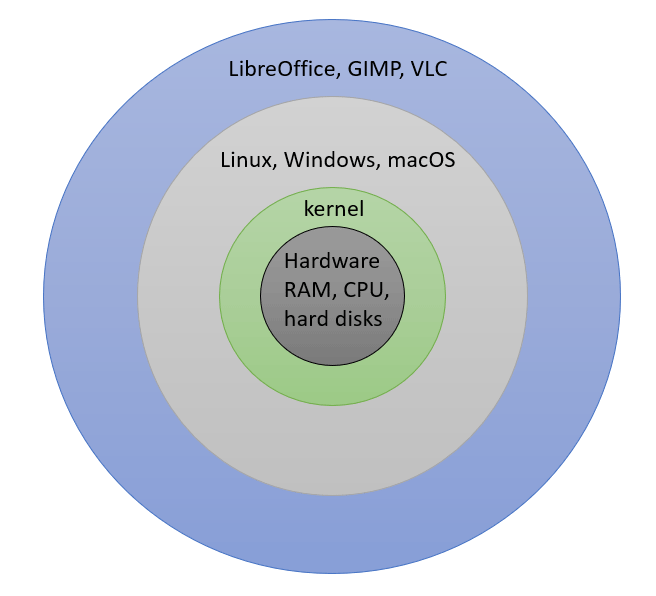
Roles of applications, OS, and the kernel
Programming languages fall into two types: high-level and low-level. High-level programming languages are easy to type and compile. However, the code you develop with these languages is meaningless to the system’s hardware. The hardware doesn't understand it. It understands low-level assembly language. Low-level coding is complex. It requires a lot of knowledge, experience, and time.
This is where responsibilities split into applications, the OS, and the kernel. Developers build applications in high-level programming languages. They do not need to worry about how it will execute on the hardware. The kernel takes this responsibility. It executes the code on the hardware. However, it takes input and gives output only in low-level assembly language. The OS fills this gap. It understands and contains both languages. It takes input from the application in the high-level language, converts it into the low-level programming language, and passes it to the kernel. If the kernel generates output, it converts it into the high-level programming language the application uses and passes it to the application.
Example
On a system, a user opens a media file stored on the hard disk and plays it in VLC. In this example, VLC is an application software. It asks the operating system to provide the media file the user wants to play. The operating system converts that request into the language the kernel understands and gives it to the kernel. The kernel finds the media file on the hard disk and loads that file into RAM. VLC plays it from RAM.
Linux distributions and distributors
In 1991, Linus Torvalds developed a UNIX-like kernel, named it Linux, and made it available to all as open-source software under the GPL. Since then, it has been freely available to all. If you are an OS developer and need a kernel to build your Linux OS, you can use it freely without any restrictions. You can also add other open-source software, such as the GNOME desktop for the graphical interface, Apache for a web server, and Sendmail for a mail server, or any other software to your Linux to meet your specific requirements. You have full control over your Linux OS. You can distribute it freely or under certain conditions. If you distribute or share it with others, you become a Linux distributor, and your Linux becomes a Linux distribution. In other words, a Linux distributor is a company or community that develops, manages, and distributes a customized version of Linux for particular devices such as computers or servers. The customized version is called a Linux distribution.
Key points:-
- A Linux distribution includes a Linux kernel, OS, and applications for particular requirements.
- A Linux distribution can vary in size. For example, it can be a small, single-purpose distribution or a multi-purpose distribution containing open-source programs.
- The distributor must actively monitor and update the distribution as required and share those updates with everyone who has installed it.
Open source software
Every software program built from source code. By default, only developers have full permission to the source code of the program they build. The license type they choose to distribute or sell their software defines permissions for other developers and users. If they choose a "proprietary" or "closed source" license, users get no rights to the source code. They can install, run, and use the program for personal or commercial use. However, they have no access to the source code. If they choose an “open source” license for their program, anyone can use, study, modify, and share the source code of that program.
With an open-source license, you can do the following things.
- You can view the program's source code and improve it.
- You can use the program's source code for learning and training.
- You can use the program's source code for building your own custom software.
- You can modify the program's source code to customize the software for your environment.
- You can fix security bugs and loopholes even before the original developers do.
An open source license can be further classified into two types:-
- Copyleft
- Permissive
A copyleft license requires that anyone who distributes the source code, with or without changes, must share it under the same license. It helps keep existing code and improvements to that code open and increase the amount of available open source code. GNU and GPL are examples of copyleft license types.
Permissive licenses allow you to use the source for any purpose as long as you keep the copyright and license statements intact, including reusing code under more restrictive or proprietary licenses. MIT/X11 license and the Apache Software License 2.0 are examples of permissive licenses.
RHEL Linux
Red Hat is a leading IT company. It actively participates in and supports the open source community. It builds and distributes several open-source software products. Among them, RHEL (Red Hat Enterprise Linux) is the most popular. It is the most widely used Linux distribution for commercial purposes. Red Hat distributes it under an open-source license. You can download the latest version of RHEL from the official website of Red Hat. You can install and use it on any supported system. You can view, edit, and modify its source code. You will receive support and updates for a limited time. After that, you need a paid subscription to continue receiving support and updates. You need a subscription only for support and updates. You don't need to pay or buy a subscription for the installed copy. You can keep using it as long as you want.
Red Hat takes several steps to keep RHEL stable, secure, and production-ready. Each program that becomes part of RHEL goes through several testing stages. Red Hat supports and sponsors two Linux distributions (Fedora and CentOS) mainly for this purpose.
If it wants to introduce a new program or feature, it does that on Fedora. Fedora serves as a development lab for RHEL Linux. It fixes all issues, bugs, and security patches as they arise. After testing it on Fedora, it releases the stable version of that program on CentOS.
Before 2019, CentOS was a community-driven project. Since Red Hat releases RHEL under the open-source license, anyone can use and redistribute it under any name. This community cloned and distributed each major RHEL release as CentOS. In the cloned version, they renamed every occurrence of Red Hat to CentOS.
As mentioned earlier, RHEL is the most popular Linux distribution in production environments. However, it comes with a nominal subscription fee. Many companies and users wanted to use RHEL without paying the subscription fee, so they adopted CentOS. This made CentOS the most preferred alternative to RHEL. Since CentOS was a cloned version of RHEL, technical issues or bugs often affected both in similar ways. Both RHEL and the CentOS community had to fix them with considerable duplicate effort. To address this issue, Red Hat adopted the CentOS project. Now, Red Hat officially supports CentOS Stream. It uses CentOS to test new features before adding them to RHEL. It contributes code, developer time, resources, and support, and often collaborates with CentOS developers to achieve the most stable, well-tested versions of the added features.
After testing the new features on both distributions, it integrates them into RHEL. This way, every feature on RHEL is well tested on every kind of environment. If an issue still arises, Red Hat has the world’s largest community of developers to fix it in real time, around the clock.
Comparing Fedora, CentOS and RHEL
The following table compares Fedora, CentOS, and RHEL.
| Lifecycle | 12-18 months | 5 years | 10 years |
| Documentation | Community | Community | Red Hat |
| Software certification | No | No | Yes |
| Around-the-clock expert support | No | No | Yes |
| Product security | No | No | Yes |
| Management tools | No | No | Yes |
Summary
- Linux is a free and open-source operating system.
- You can view, modify, and distribute Linux source code.
- A Linux distribution is an installable operating system that includes a Linux kernel, libraries, and programs for specific or general requriements.
- RHEL is the most widely used open source, enterprise-ready, commercially supported Linux distribution.
- Fedora serves as the development platform for RHEL.
Author Laxmi Goswami Updated on 2026-09-15