Role and Function of Hypervisors, Virtual Machines, and Containers
Virtualization and containers are the two most widely used techniques in modern networks. They let you build and run customized, isolated environments on existing infrastructure to meet specific requirements. Since they are independent components, they have their own network endpoints. These endpoints connect to the external network using the existing infrastructure. This tutorial explains these endpoints, how they function, and how to troubleshoot them.
The following CCNA 2.0 exam objectives are addressed in this tutorial.
1.0 Network Infrastructure and Connectivity
1.2 Describe the role and function of hypervisors, virtual machines, and containers.
Virtualization
Virtualization is a modern technique that simulates hardware in a software layer. You can use simulated hardware the same way you use physical hardware. For example, if you have a computer and want to install and use two operating systems on it at the same time, you can use virtualization. The following steps explain the workflow for this requirement.
- Install the first operating system on the physical computer as usual.
- Install virtualization software on the first operating system.
- Create a virtual computer in the virtualization software and install the second operating system.
- Both operating systems will work separately. You can use them for entirely different purposes.
Virtualization components
Virtualization uses many components to provide its features and functions. Not all of these are tested in the CCNA exam. CCNA exam objectives explicitly focus on components it uses to communicate with the underlying infrastructure and external networks. For the CCNA exam, you need to learn the following components and their functions.
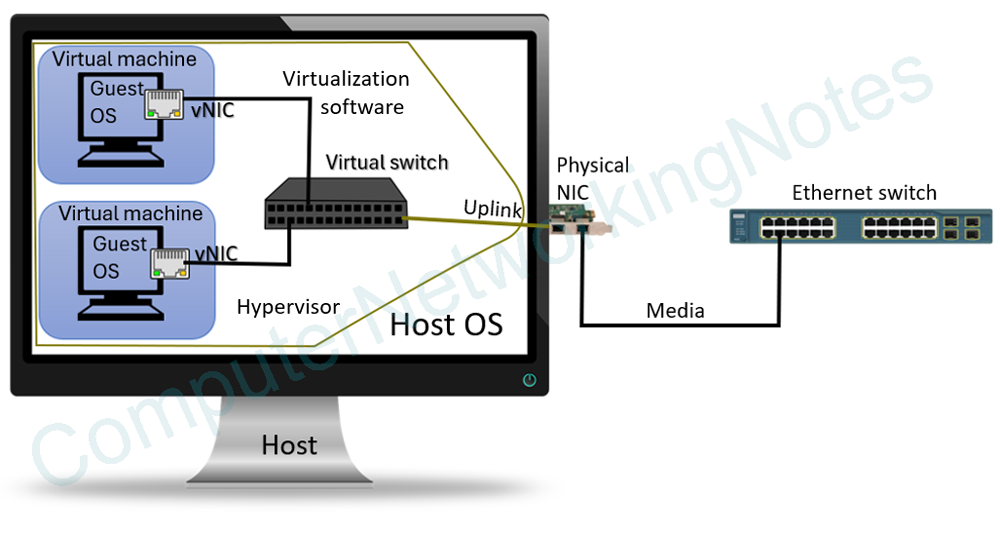
Host
A host is a computer, server, or a device on which you install virtualization software.
Virtualization software
Virtualization software lets you simulate hardware at the software level. Most modern operating systems (such as Windows and Linux) include virtualization software. If needed, you can also install third-party virtualization software such as VMware or VirtualBox.
Hypervisor
A hypervisor is the technique virtualization software uses to simulate hardware in the software layer. It lets you create and run virtual machines on the host system.
Virtual machine
A virtual machine is a virtual computer simulated entirely in software. It functions exactly like a physical computer.
Guest OS
A guest OS is the OS you install on the virtual machine. It behaves like an independent OS with its own applications and data.
vNICs
A virtual machine's network interface card is called a virtual network interface card. It functions like a physical network interface card, but in software. You can create multiple vNICs on a virtual machine. However, each vNIC requires all the configuration you do on a physical network interface.
Virtual switch
A virtual switch sits between the virtual machines and the host system. It connects virtual machines’ NICs to one or more physical NICs on the host system. Those physical NICs act as host uplinks and connect virtual machines to external networks.
Troubleshooting
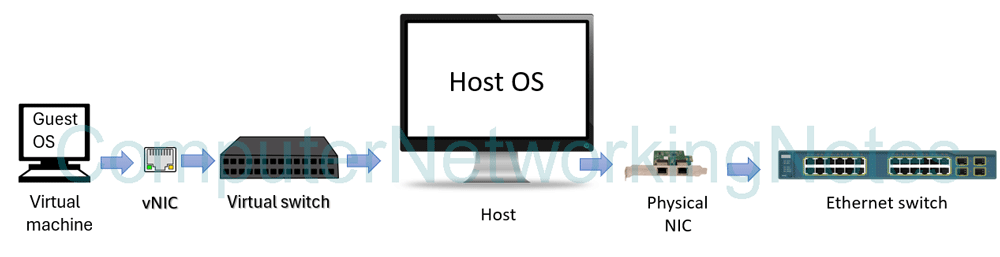
The CCNA exam primarily focuses on diagnosing and troubleshooting connectivity issues. To diagnose and troubleshoot a connectivity issue, first understand how data flows between a virtual machine and the network. The following image shows how data flows from a virtual machine to the network.
virtual machine => vNIC => virtual switch => host’s physical interface => to the network
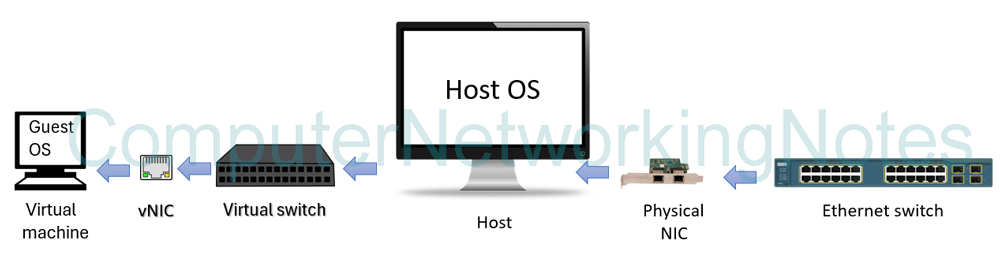
The following image shows how data flows from the network to a virtual machine.
From the network => host’s physical interface => virtual switch => vNIC => virtual machine
Virtual machine
If the vNIC is disabled or lacks a valid IP configuration, the VM may report no connectivity even though the host’s NIC is up and connected to the network. If it is connected to the incorrect virtual network, the VM may receive an address from a different subnet or fail to reach its intended gateway.
- Check that the vNIC is enabled and up.
- Verify that the vNIC has a valid IP configuration.
- Check that the vNIC is connected to the right virtual network.
Virtual switch
A virtual switch connects virtual machines and bridges them with the external network. If it fails, it affects all virtual machines connected to it.
- If all virtual machines lose connectivity, check the virtual switch they are connected to.
- If virtual machines can communicate with each other but not with the external network, check the link and configuration between the virtual switch and the host’s NIC.
- If a virtual machine has an incorrect IP configuration, check the virtual switch it is connected to.
Host’s NIC
The host’s physical NIC connects all virtual machines to the external network. If it fails, all virtual machines and containers running on the host system lose connectivity with the external network.
- Check that the cable is plugged in.
- Check the connectors at both ends of the cable.
- Check that the cable is the correct length and in good physical condition.
- Check that the remote side of the cable is UP and functional.
Containers
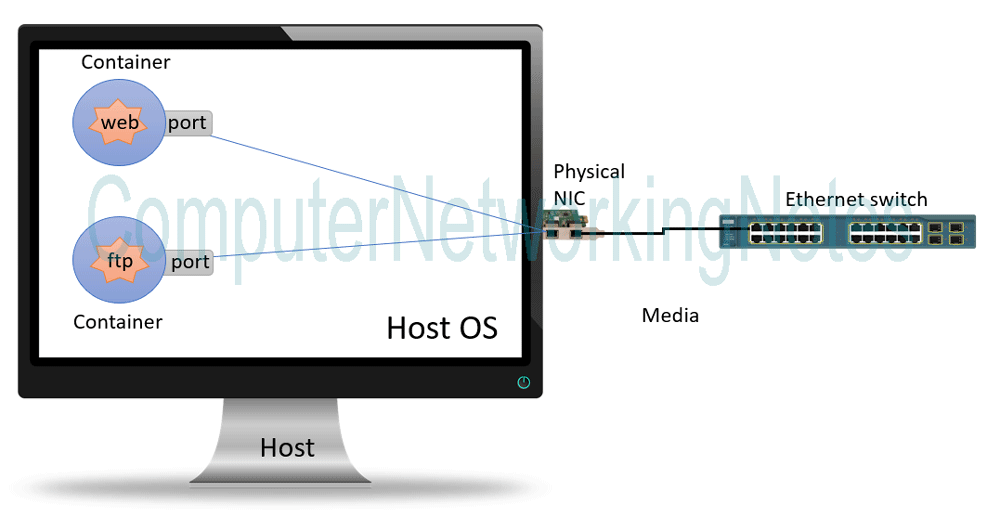
Virtual machines are heavy on resources. Their minimum hardware requirements depend on the operating system you install. This creates performance and scalability issues. For example, if you want to run three services separately from each other on a Linux server: a web server, an FTP server, and a file server. You can create three virtual machines, one for each. However, this is not an optimized approach and unnecessarily consumes extensive hardware resources because you can not run a service directly on a virtual machine. To run a service in a virtual machine, you first need to install a supporting operating system, then install and run the service on it. For three virtual machines, you need to install three operating systems. Each operating system requires adequate RAM, CPU, and disk space.
A container solves this issue. It isolates the necessary environment to run a service directly on the host system. Because it runs directly on the host system, it does not require a full guest operating system. To run three services, you can create three containers. Each container requires only the resources the service running in it needs. They depend on the host's networking to communicate. Traffic can move between them through the internal networking. To access them from outside the host, you need to expose or map an application port.
Based on requirements, you can open different ports. For example, if you run a web server inside a container, you can configure it to listen on two ports: one for internal traffic and another for external users. If the necessary port isn't open, the application can run inside the container, but it will remain unreachable from another device.
Troubleshooting
- If a host is reachable but its containers are not, verify that the necessary ports are open. If ports are open, check the firewall configuration.
- If only one container is not accessible, check its configuration.
- If you can't access all containers and the host, check the physical links, upstream network switch, and the default gateway router.
Summary
| Component | Function | Isolation | Networking | Troubleshooting |
| Hypervisor | Create and run virtual machines in the software layer | Separate virtual machines | Use host networking | Check when all virtual machines become inaccessible |
| Virtual machine | Provide a single virtual machine | Run a guest operating system | Connect to the host network through a virtual switch | Check when a specific virtual machine is not accessible |
| Container | Run a particular application | Create an isolated environment on the host system | Use managed virtual networking on the host | Check open ports and the service configurations |
| Virtual NIC | Network interface card on the virtual machine | Provide IP addressing to a single virtual machine | Connect to virtual switch | Check its state and configuration when the connected virtual machine is not accessible |
| Virtual switch | Connect virtual NICs to the host’s NIC | Forward traffic between virtual machines and the external network | Connect to the host’s NIC | Check when all virtual machines lose connection to the external network |
| Host NIC (uplink) | Connect the host system to the external network | Run with its own IP configuration and connect directly to the external network | Connect to an access switch | Check when the host loses connectivity |
Conclusion
Virtualization adds new connection points on top of the physical network. Virtual machines, containers, Hypervisors, virtual NICs, virtual switches, host operating systems, and physical uplinks all depend on each other for network connectivity. In other words, they form a dependency chain. If any one component fails in this dependency chain, it takes down all other components that depend on it. In this tutorial, I explained the steps to troubleshoot this dependency chain. Understanding these steps lets you quickly identify the exact failure point.
Author Laxmi Goswami Updated on 2026-11-07