PPP Protocol and Encapsulation method Explained
PPP is a feature-rich open source protocol. It provides encapsulation for WAN interfaces. Dynamic addressing, authentication, callback, and compression are its main features. It can perform error detection, correction, and link quality checks. This tutorial explains how to configure, test, and verify it on Cisco routers.
PPP includes three components: Framing, LCP, and NCP. Framing defines how network-layer packets, such as IP packets, are encapsulated within a frame. To support multiple network layer protocols, it uses the Protocol Type field in the header.

LCP (Link Control Protocol)
LCP establishes and maintains data-link connections. It provides the following functions.
Authentication: It supports password-based authentication.
Compression: It boosts efficiency by compressing outbound and decompressing inbound data.
Error Detection: It uses the LQM (Link Quality Monitoring) tool to detect interfaces with excessive errors. Once a faulty interface is identified, LCP disables it and reroutes traffic to a better route.
Looped Link Detection: It finds loops. If it detects redundancy, it shuts down the interface and reroutes the traffic.
Multilink: It can combine multiple links into a single logical Layer 3 connection. For example, it can be used to build a single 128 Kbps link from two 64 Kbps links.
Call Back: When enabled, the remote router calls back the originating router after authentication. For example, if routers R1 and R2 use this feature, R1 connects to R2 and completes authentication. Then, R2 disconnects and reconnects to R1, so R1 pays only for authentication, and R2 pays for the rest of the session.
NCP (Network Control Protocol)
NCP is the third component of PPP. It allows multiple network layer protocols (such as IPv4, IPv6, and IPX) to be used over a single point-to-point connection. At the Data Link layer, it sets up and configures various network-layer protocols for transport over PPP links. PPP itself does not operate at Layer 3. It uses NCP to handle network-layer protocol encapsulation across the link.
PPP Authentication
PPP supports authentication. Authentication allows devices to verify the identity before transmitting data. For example, two routers (R1 and R2) are connected via a serial link. R1 wants to send data to R2. However, it wants to be sure that the remote device claiming to be R2 is the real R2. In this case, R1 will initiate the authentication process. In the authentication process, R2 will prove its identity. PPP deploys two authentication protocols: PAP and CHAP.
PAP (Password Authentication Protocol)
PAP authentication is a two-step process. In step one, the router that wants to be authenticated will send its username and password to the router that will authenticate it. In the second step, if the username and password match, the remote router will authenticate the originating router. If not, the authentication process will fail.
Example
R1 sends the username and password in clear text to R2, which authenticates R1. R2 checks the username and password against stored values. If they match, R2 acknowledges authentication and readiness for data transfer.

PAP authentication occurs only when the link is initially established. Afterward, no further authentication is performed for that session. PAP transmits case-sensitive usernames and passwords in clear text.
CHAP (Challenge Handshake Authentication Protocol)
CHAP uses a three-step process.

Step1
R1 sends its username (no password) to R2.
Step2
Routers that use CHAP maintain a local authentication database. This list contains all allowed hosts and their credentials. R2 locates an entry for R1 in its database. If it does not find an entry, it terminates the connection. If an entry exists, it generates a random key and hashes it with MD5 using the password listed in the entry. The hashed value (challenge) and the random key are returned to R1.
Step3
R1 receives the hashed value and random key. It hashes the received random key and the locally stored password using MD5, then compares the generated hash with the received hash. If both match, it accepts the connection. If not, it drops the connection.
CHAP uses a one-way MD5 hash for each authentication attempt, making each value valid only once and preventing replay attacks. The password is never sent over the link, keeping it secure.
Differences between PAP and CHAP
| PAP | CHAP |
| Perform authentication in two steps. | Perform authentication in three steps. |
| The username and password are sent via the link. | Only the username is sent across the link. |
| The actual password is sent across the link. | The actual password is never sent across the link. |
| The password is sent in clear text format. | The password is hashed with a random key through the MD5 hash function. |
| It is a less secure authentication protocol. Anyone tapping the wire can learn the password. | It is a secure authentication protocol. Since the actual password is never sent over the wire, no one can learn it through wiretapping. |
| It occurs only during initial link establishment. | It is performed at initial startup and, if required, any time during the session. |
PPP configuration
PPP configuration is straightforward. It requires only one command in Interface configuration mode. To enable PPP on an interface, enter its Interface configuration mode and run the following command.
Router(config-if)#encapsulation ppp
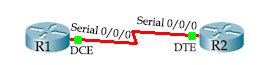
R1
Router>enable
Router#configure terminal
Router(config)#interface serial 0/0/0
Router(config-if)#ip address 192.168.1.1 255.255.255.252
Router(config-if)#clock rate 64000
Router(config-if)#bandwidth 64
Router(config-if)#encapsulation ppp
Router(config-if)#no shutdown
Router(config-if)#exit
Router(config)#
R2
Router>enable
Router#configure terminal
Router(config)#interface serial 0/0/0
Router(config-if)#ip address 192.168.1.2 255.255.255.252
Router(config-if)#encapsulation ppp
Router(config-if)#no shutdown
Router(config-if)#exit
Router(config)#
| Command | Description |
| enable | Enter Privileged Exec mode. |
| configure terminal | Enter Global configuration mode. |
| interface serial 0/0/0 | Enter Interface configuration mode for interface serial 0/0/0. |
| ip address 192.168.1.[1-2] 255.255.255.252 | Assign the ip address to the interface. |
| clock rate 64000 | Set clock rate to 64000 (Required only on the DCE side). |
| bandwidth 64 | Set badwidth to 64 (Required only on the DCE side). |
| encapsulation ppp | Set default encapsulation to ppp. |
| no shutdown | Enable the interface. |
| exit | Exit the current configuration mode. |
PPP Authentication
PPP authentication requires two essential parameters:-
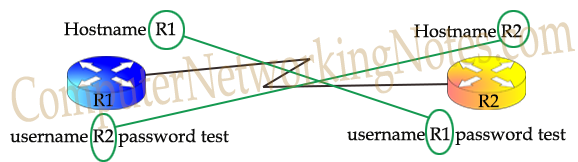
- Unique hostname of the local router
- Username and password for the remote router
Hostname of the local router
The hostname command in Global configuration mode assigns the hostname. Assign a unique hostname to each router as below.
R1
Router(config)#hostname R1
R2
Router(config)#hostname R2
Username and password for the remote router
The following command in Global configuration mode sets the username and password for the remote router.
Router(config)#username [remote_hostname] password [matching_password]
The username is the hostname of the remote router that will connect to this router. Hostname and password are case sensitive. Set the username and password on both routers.
R1
R1(config)#username R2 password test
R2
R2(config)#username R1 password test
Passwords assigned using the above command are stored in the running configuration in clear text and can be viewed with the show running-config command. To encrypt these passwords, use the service password-encryption command in global configuration mode. The username must match the remote router's hostname. Both routers must be configured with matching usernames and passwords.
Enabling PAP Authentication
The ppp authentication pap command in Interface configuration mode enables PAP authentication.
R1
R1(config)#interface serial 0/0/0
R1(config-if)#encapsulation ppp
R1(config-if)#ppp authentication pap
R1(config-if)#exit
R1(config)#
R2
R2(config)#interface serial 0/0/0
R2(config-if)#encapsulation ppp
R2(config-if)#ppp authentication pap
R2(config-if)#exit
R2(config)#
Enabling CHAP Authentication
The ppp authentication chap command in Interface configuration mode enables CHAP authentication.
R1
R1(config)#interface serial 0/0/0
R1(config-if)#encapsulation ppp
R1(config-if)#ppp authentication chap
R1(config-if)#exit
R1(config)#
R2
R2(config)#interface serial 0/0/0
R2(config-if)#encapsulation ppp
R2(config-if)#ppp authentication chap
R2(config-if)#exit
R2(config)#
Using both CHAP and PAP on the same link
Although it's not recommended, you can enable both PAP and CHAP on the same link.
R1
R1(config)#interface serial 0/0/0
R1(config-if)#encapsulation ppp
R1(config-if)#ppp authentication chap ppp
R1(config-if)#exit
R1(config)#
R2
R2(config)#interface serial 0/0/0
R2(config-if)#encapsulation ppp
R2(config-if)#ppp authentication chap ppp
R2(config-if)#exit
R2(config)#
When both authentication methods are configured on the same link, only the first method is used during authentication. The second method serves as a backup and is used only if the first method fails.
Verifying and Troubleshooting PPP
Use the show interface [interface] command to verify PPP implementation.
R1#show interface serial 0/0/0
Serial0/0/0 is up, line protocol is up
  Hardware is HD64570
  Internet address is 192.168.1.1/30
  MTU 1500 bytes, BW 64 Kbit, DLY 20000 usec,
     reliability 255/255, txload 1/255, rxload 1/255
  Encapsulation PPP, loopback not set, keepalive set
[Output omitted]
The first line of the output provides the information you can use to verify and troubleshoot PPP.
| Line status | Protocol status | Possible reason | Possible solution |
| Administratively Down | Down | Interface is shut down. | Use the no shutdown command from Sub-interface mode. |
| Down | Down | Physical layer issue. | Check the cable, connector, and other connecting devices. |
| UP | Down | Data Link Layer issue. | Check configuration. |

In the above output, the message Serial 0/0/0 is up, line protocol is down indicates that the physical layer is functioning correctly. However, there is a configuration issue at the data link layer. Next, observe the states of LCP, IPCP, and CDPCP. A Closed state for any of these protocols indicates an issue with the LCP setup process, resulting in data link layer failure.
The following sections describe common causes of data-link failures.
Mismatched WAN Encapsulation
In a point-to-point link, the encapsulation method at both ends must match. If it does not match, the link does not come up. Use the show interfaces [interface] command to view the encapsulation type.

Solution: Reconfigure one end’s interface to match the encapsulation method used on the other end.
Mismatched IP configuration
Although this issue is not directly related to PPP configuration, it blocks PPP from functioning. Furthermore, this issue cannot be detected from the output of the show interface [interface] command, as the output may indicate that "Serial 0/0/0 is up, line protocol is up", suggesting that the interface is operational. However, attempts to ping the remote router may fail because PPP, HDLC, and Frame Relay are Layer 2 protocols and do not verify Layer 3 (IP) configuration. As a result, even if the link is up, IP packets may not be transferred.

Solution: Configure IP addresses on both ends of the link using the same subnet.
Debug PPP Authentication
To determine whether the issue is related to PPP authentication, use the debug ppp authentication command. If PPP encapsulation and authentication are correctly configured, this command will display output similar to the following.
R1# debug ppp authentication
PPP authentication debugging is on
R1#
R1: %LINK-3-UPDOWN: Interface Serial0/0/0, changed state to up
R1: Se0/0/0 PPP: Using default call direction
R1: Se0/0/0 PPP: Treating connection as a dedicated line
R1: Se0/0/0 PPP: Session handle[45004] Session id[12]
R1: Se0/0/0 CHAP: O CHALLENGE id 5 len 23 from "R1"
R1: Se0/0/0 CHAP: I CHALLENGE id 5 len 23 from "R2"
R1: Se0/0/0 PPP: Sent CHAP SENDAUTH Request
R1: Se0/0/0 CHAP: I RESPONSE id 5 len 23 from "R2"
R1: Se0/0/0 PPP: Received SENDAUTH Response PASS
R1: Se0/0/0 CHAP: Using hostname from configured hostname
R1: Se0/0/0 CHAP: Using password from AAA
R1: Se0/0/0 CHAP: O RESPONSE id 5 len 23 from "R1"
R1: Se0/0/0 PPP: Sent CHAP LOGIN Request
R1: Se0/0/0 PPP: Received LOGIN Response PASS
R1: Se0/0/0 CHAP: O SUCCESS id 5 len 4
R1: Se0/0/0 CHAP: I SUCCESS id 5 len 4
If something is incorrect or authentication fails, the output would look like the following.
R1# debug ppp authentication
PPP authentication debugging is on
! Lines omitted for brevity
R1: Se0/0/0 CHAP: O CHALLENGE id 1 len 23 from "R1"
R1: Se0/0/0 CHAP: I RESPONSE id 1 len 23 from "R2"
R1: Se0/0/0 CHAP: O FAILURE id 1 len 25 msg is "Authentication failed"

To fix this issue, configure the correct username and password on both routers. Additionally, the authentication type must be identical on both ends of the link. If one end is configured for PAP and the other for CHAP, the link will not function.

To resolve this issue, configure both ends to use the same authentication type.
This tutorial is part of the tutorial series "WAN Terminology Explained with Encapsulation Protocols and Methods". Other parts of this series are the following.
Chapter 1 WAN Tutorial – Basic WAN Switching Concept Explained
Chapter 2 HDLC Protocol and Encapsulation Method Explained
Chapter 3 PPP Protocol and Encapsulation Method Explained
Chapter 4 Basic Concepts of Frame Relay Explained in Easy Language
Chapter 5 How to configure Frame Relay: Step-by-Step Guide
Conclusion
PPP is a robust, flexible protocol widely used to establish direct connections between network devices over WAN links. Its modular design and features (such as encapsulation, authentication (PAP and CHAP), compression, error detection, and multilink support) make it suitable for a variety of networking environments. By understanding and correctly configuring PPP and its authentication methods, you can ensure secure, reliable, and efficient data transmission.
Author Laxmi Goswami Updated on 2026-03-10