Firewalld Basic concepts Explained with Examples
A firewall is a security mechanism. It protects the system from unwanted traffic and external security threats. It allows you to define rules for incoming traffic. Based on these rules, it allows or denies the incoming traffic.
The firewalld daemon
The firewalld daemon provides the firewall service. The firewall service is dynamic. A dynamic service does not require a restart for a rule change. Since the firewall service is dynamic, creating, updating, and removing rules does not require a service restart. However, a configuration change requires a service restart. To provide a dynamic firewall service, the firewalld daemon maintains separate runtime and permanent configurations. Runtime configuration remains in RAM. It does not require a restart. Any change made to it takes effect immediately. However, it does not persist after the service reloads. Permanent configuration resides in files. It requires a service reload to take effect. At startup or service reload, firewalld populates the runtime configuration from the permanent configuration and puts it in RAM. It uses this configuration until the service reloads again or the system restarts. It uses the runtime configuration to allow or deny traffic.

Zones
Based on interface and source address, firewalld categorizes incoming traffic into zones and uses them to handle similar traffic separately. Let us take an example.
A server is running the web service. It has two interfaces. The first interface connects it to the public network. The second interface connects it to the private network. The administrator has the following security requirements.
- Allow external users to access only the web service running on the web server using the public network.
- Allow internal users to connect to the web server without any restriction.
Zones allow you to divide incoming traffic based on NICs. You can create two zones: public and private. In the public zone, you can configure a rule that allows incoming traffic only if it is coming on port 80. In the private zone, you place a rule that allows all traffic to pass through. Later, you can assign the public zone to the first interface and the private zone to the second interface.

Firewalld has the following predefined zones.
| Name | Description |
| Trusted | It allows all incoming traffic. Use this zone to handle traffic that you can trust unquestioningly, as it filters nothing. |
| Home | It is suitable for a home network. It allows return traffic and connections for the following services: SSH, MDNS, IPP-Client, Samba-Client, and DHCPv6-Client. |
| Internal | With minor changes, it is similar to the home zone. It is suitable for an internal network. It also allows return traffic and incoming connections for the following services: SSH, MDNS, IPP-Client, Samba-Client, and DHCPv6-Client. |
| Work | It is suitable for the work network. It allows return traffic and the following services: SSH, IPP-client, and DHCPv6-client. |
| Public | It is suitable for a public network. It allows return traffic and incoming traffic only for the SSH and DHCP6-client services. It is the default zone. |
| External | It is suitable for masquerading. It allows return traffic and SSH service only. |
| Dmz | It limits access to the internal network. It also allows return traffic and incoming traffic for the SSH service only. |
| Block | It rejects all incoming traffic with the "icmp-host-prohibited" message. It allows only return traffic. |
| Drop | It rejects all incoming traffic without sending any error message. It allows only return traffic. |
Key points
- When a packet arrives in the system, firewalld checks its source address to find whether that address belongs to a specific zone. If yes, it processes that packet based on the rule defined in that particular zone. It allows the administrator to define and activate multiple zones, even if there is only one NIC available in the system.
- If the packet does not belong to any specific zone, firewalld attempts to determine the zone based on the source address and interface through which the packet entered the system. If the NIC on which the packet arrived belongs to a specific zone, it processes the packet based on the rules specified in that zone.
- If not, it filters the packet based on the rules defined in the default zone.
- You can set any predefined or custom zone as the default zone.
- Each zone has its own set of independent rules.
- As per the requirement, you can create a new zone or update existing zones.
Zone files
It uses zone files to save zone information and configurations. It places predefined zone files in the /usr/lib/firewalld/zones directory. It puts custom zone files in the /etc/firewalld/zones directory.

Predefined zone files use a self-explanatory XML format to save configuration. It allows you to get details about a specific zone. For example, to know the purpose and allowed services of the public zone, use the following command.
#cat /usr/lib/firewalld/zones/public.xml

Services
The firewalld provides a built-in abstraction layer over the low-level firewall rules for commonly used services, such as SSH, DHCP, and HTTP. It maps services to their ports and protocols and defines access rules. It makes firewall management easier, less error-prone, and more reflexive.
The following table lists services defined in the default zone files.
| Name | Description |
| ssh | Manage traffic for the local SSH Server on port 22 (TCP) |
| dhcpv6-client | Manage traffic for DHCPv6 client on port 546 (UDP) |
| ipp-client | Manage traffic for the local printing server service on port 631 (UDP) |
| samba-client | Manage traffic for local Windows files and printer sharing service on port 137 (UDP) and 138 (UDP) |
| mdns | Manage traffic for Multicast DNS local link service on port 5353 (UDP) |
The following command shows all predefined services.
#firewall-cmd --get-services

To get detailed information about a particular service, use the following command.
#firewall-cmd --info-service=RH-Satellite-6

Similar to zone files, it uses service files to save information and configurations for services. It saves default service files in the /usr/lib/firewalld/services/ directory.
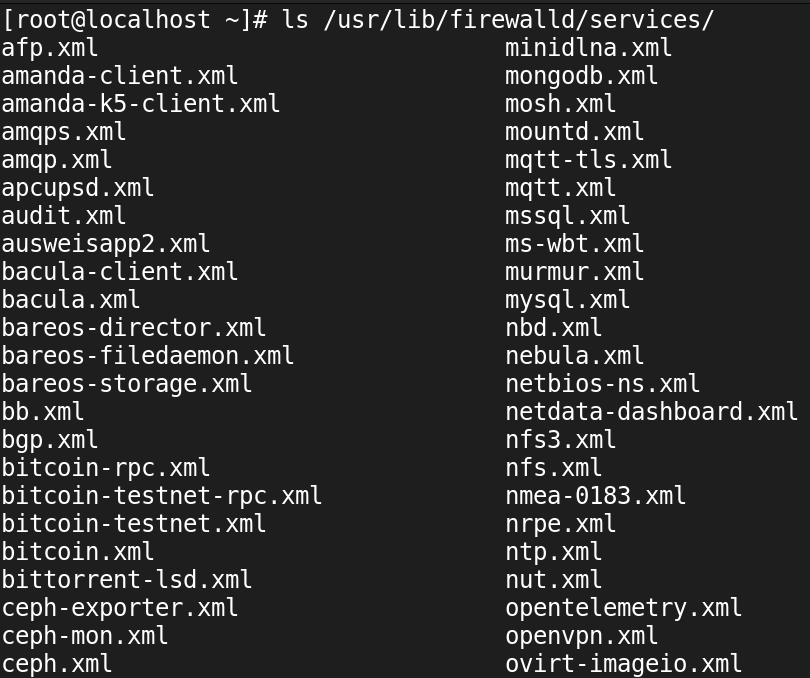
It places custom service files in the /etc/firewalld/services/ directory.

If both the system default and a custom file exist for a service, it uses the custom file. A custom file always overrules the system default.
A service file configuration defines the required kernel modules and ports that require filtering. Service configuration files also utilize XML tags to store information and configuration settings. You can check the configuration file for any service to view its details. For example, the following command shows configuration for the SSH service.
#cat /usr/lib/firewalld/services/ssh.xml

A service file defines only the configuration the firewalld service needs to filter data for that service. It does not affect the actual service in any manner. For example, a service file for the SSH service defines the allowed port for the SSH service. If the system receives data for the SSH service on the allowed port, it lets it in. If it receives data on any other port, it discards that data. To manage the SSH service, use the configuration files for the SSH service. To start, restart, or manage the SSH service, use the systemd command.
Firewall rules
Firewall rules implement configurations to allow or block network traffic. They control the flow of network traffic to protect the system from security threats. They can use many attributes for data filtration, such as:
Source and destination IP addresses, protocols (TCP, UDP), ports, and network interfaces. The firewalld organizes the firewall rules into zones. Each zone has its own set of rules that determine how to filter the incoming traffic.
This tutorial is part of the tutorial " Setting up a firewall using firewalld service.". Other parts of this tutorial are as follows:
Chapter 1 Firewalld Basic concepts Explained with Examples
Chapter 2 How to Configure Firewalld in Linux
Chapter 3 Firewalld Rich Rules Explained with Examples
Conclusion
Protecting the system with a firewall is an essential security requirement. This tutorial introduced the default firewall on a Linux system. Learning the concepts and terms explained in this tutorial helps you understand and manage the firewalld service more effectively.
Author Laxmi Goswami Updated on 2026-03-01