Cisco Packet Tracer Download – 9.0.1 and Previous Versions
Download Cisco Packet Tracer 9.0.1, the latest version of Cisco's free network simulation software, for Windows, Linux, and macOS. This page provides direct download links for the latest and previous versions of Packet Tracer, including older 32-bit and 64-bit editions. You can download the installer directly or follow the step-by-step instructions to download it from Cisco's official website. This guide also covers system requirements, installation procedures, and compatibility with older operating systems.
Choose your download method
This page provides two ways to download Cisco Packet Tracer: direct downloads and official downloads through Cisco Networking Academy.
- Direct download: Choose this option if you want to download Packet Tracer immediately without creating an account to obtain the installer or if you need a previous version. All direct download links on this page point to files hosted on Archive.org, a third-party platform.
- Official download: Choose this option if you prefer to obtain the software directly from Cisco. You can use your existing Cisco Networking Academy account or create a free account and follow the download instructions provided below.
Both download methods are free. You may need a Cisco account to sign in to Packet Tracer after installation, regardless of the download method you choose.
Download Cisco Packet Tracer 9.0.1 (Latest Version)
Cisco Packet Tracer 9.0.1 is the latest version available from Cisco, as verified on November 25, 2026. Select the appropriate installer for your operating system.
Windows — Windows 11 (64-bit)
Download Packet Tracer 9.0.1 for Windows (.exe)Linux — Ubuntu 22.04 or 24.04 LTS (64-bit)
Download Packet Tracer 9.0.1 for Linux (.deb)macOS — macOS 12 or newer (64-bit installer)
Download Packet Tracer 9.0.1 for macOS (.dmg)Download Packet Tracer 9.0.1 using torrent
Cisco Packet Tracer 9.0.1 system requirements
Before downloading and installing Cisco Packet Tracer 9.0.1, make sure your computer meets the following system requirements.
| Component | Minimum requirement |
|---|---|
| Windows | Windows 11 (64-bit) |
| Linux | Ubuntu 22.04 or 24.04 LTS (64-bit) |
| macOS | macOS 12 or newer |
| Processor | amd64 (x86-64), as listed by Cisco |
| RAM | 4 GB of free RAM |
| Disk space | 1.4 GB of free disk space |
Cisco Packet Tracer 9.0.1 is available in 64-bit editions. If you have a 32-bit computer or an older operating system, check the previous versions of Packet Tracer provided on this page.
Source: Cisco Networking Academy Resource Hub. System requirements last verified on November 25, 2026.
How to download Cisco Packet Tracer from the official website
Cisco provides the latest version of Packet Tracer for free through its Networking Academy website. If you prefer to download the software directly from Cisco, follow these steps.
Step 1: Visit the Cisco Networking Academy website
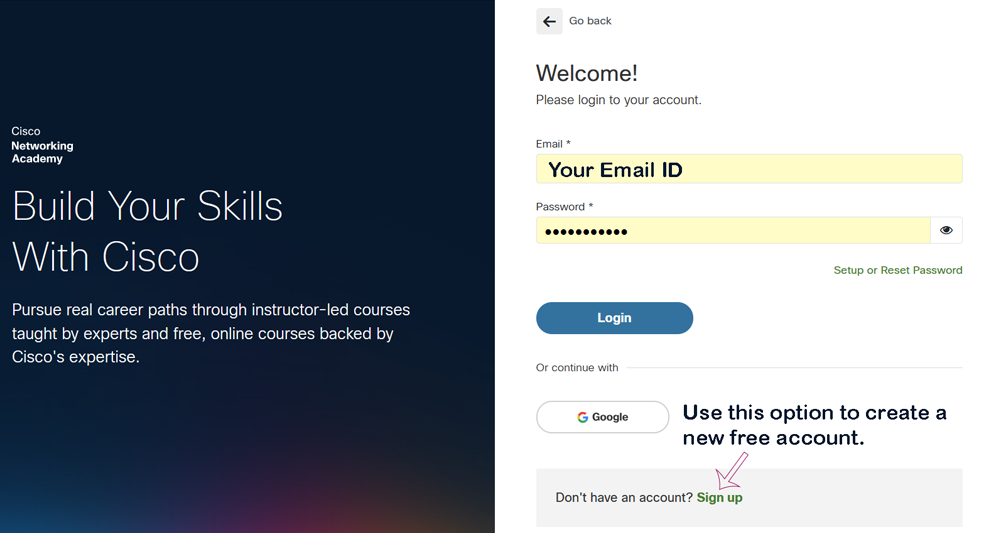
Visit www.netacad.com. Click Login if you already have a Cisco account or Sign up to create a free account.

Step 2: Log in to your Cisco account
Enter your email address and password, and click Login. If you do not have an account, use the Sign up option and complete the registration process.
Step 3: Open the Getting Started with Cisco Packet Tracer course
After logging in, open the My Learning dashboard and launch Getting Started with Cisco Packet Tracer. If it is not listed, open the course enrollment page and enroll in the free course.

Step 4: Navigate to the Packet Tracer download section
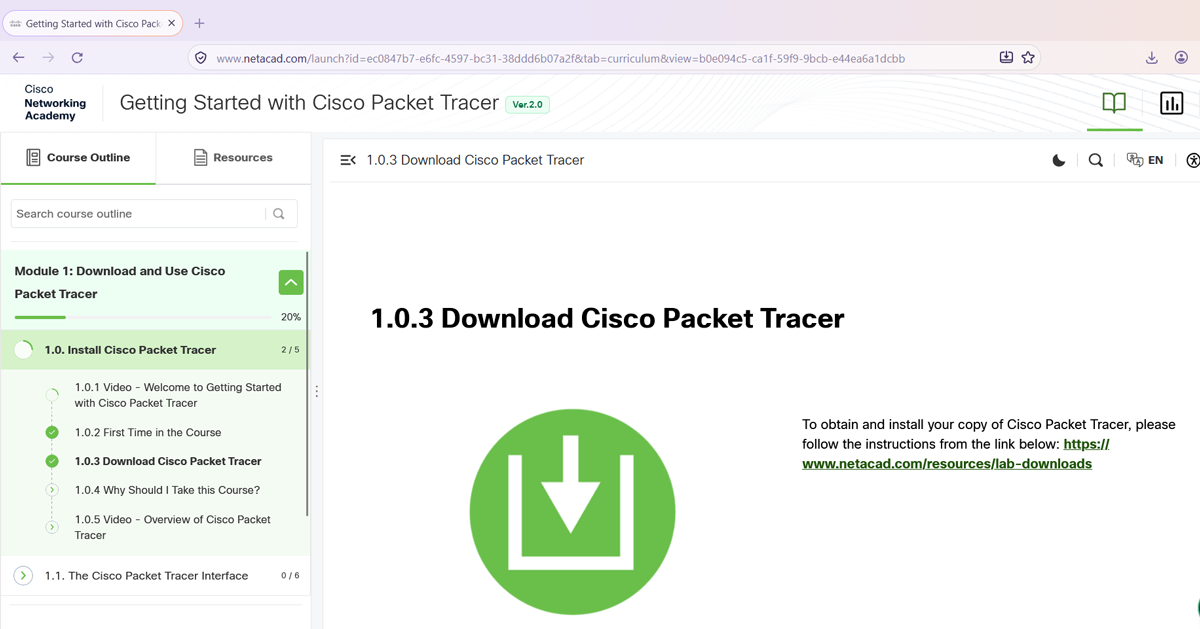
In the course outline, navigate to Module 1: Download and Use Cisco Packet Tracer → 1.0 Install Cisco Packet Tracer → 1.0.3 Download Cisco Packet Tracer. Click the Resource Hub link displayed in this section.
Step 5: Download Cisco Packet Tracer
The Resource Hub displays the available installers for Windows, Ubuntu Linux, and macOS. Select the installer that matches your operating system and save it to your computer.
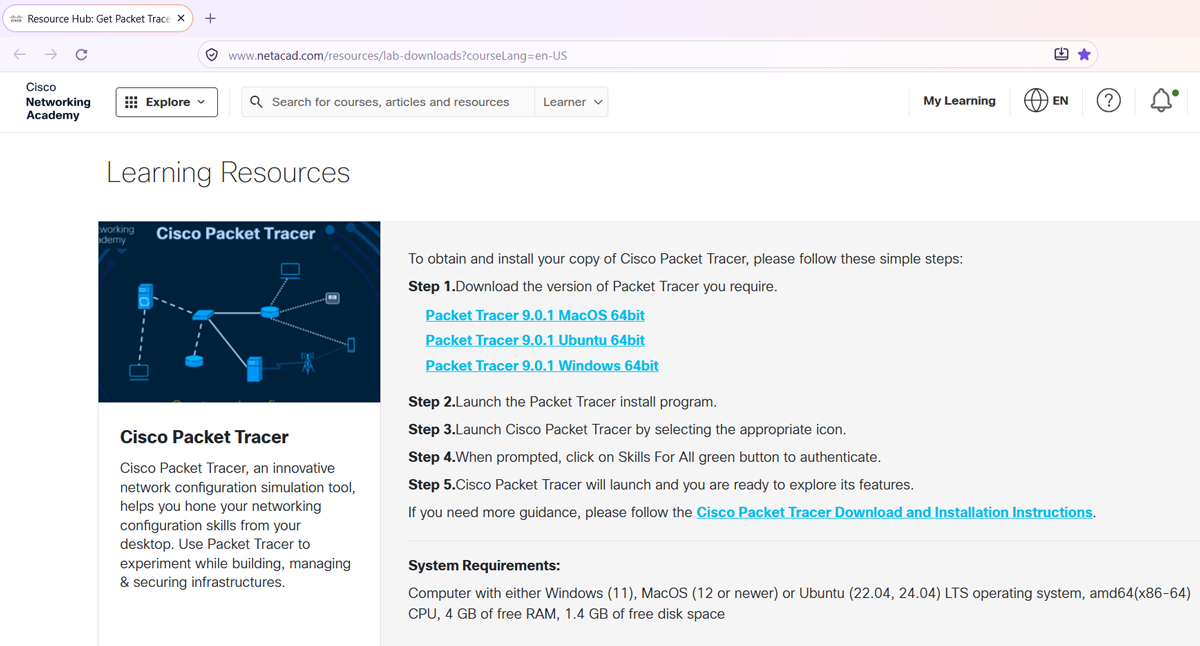
Quick download tip: If you are already logged in and have the required access, open the Cisco Networking Academy Resource Hub directly without navigating through the course modules.
How to install Cisco Packet Tracer
The following instructions apply to the current version whether you download it directly or obtain it from Cisco Networking Academy.
Install Cisco Packet Tracer on Windows
Open the downloaded .exe file, read and accept the license agreement, select the installation directory and shortcut options, and click Install. Launch Packet Tracer after setup finishes.
See our detailed Windows installation tutorial for additional setup illustrations; follow the current sign-in instructions below for version 9.0.1.
Install Cisco Packet Tracer on Ubuntu Linux
If the installer is in your Downloads directory, open a terminal and run:
cd ~/Downloads
sudo apt install ./CiscoPacketTracer_901_Ubuntu_64bit.deb
Replace the filename if yours differs. Read and accept the license agreement when prompted. Launch Packet Tracer from the Applications menu or run packettracer in the terminal.
See our Ubuntu installation tutorial for additional guidance.
Install Cisco Packet Tracer on macOS
Open the downloaded .dmg file, launch the installer, read and accept the license agreement, and follow the setup wizard. Enter your system password if prompted. After installation, open Cisco Packet Tracer from the Applications folder.
Sign in to Cisco Packet Tracer
When prompted, sign in using your Cisco Networking Academy account. If you do not have an account, create one for free. Direct downloads do not remove the application's authentication requirements.
Download previous versions of Cisco Packet Tracer
If you need an earlier version of Cisco Packet Tracer for an existing practice lab, course, older operating system, or personal preference, select your preferred version below.
Previous releases include different editions for Windows, Linux, and macOS. Both 32-bit and 64-bit installers are available for several older versions. Choose the appropriate installer according to your operating system, system architecture, and version requirements.
Download Cisco Packet Tracer 9.0.0
| Platform | Architecture | Download |
|---|---|---|
| Windows | 64-bit | Download EXE |
| Linux | 64-bit | Download DEB |
| macOS | — | Download DMG |
Download Packet Tracer 9.0.0 using torrent
Download Cisco Packet Tracer 8.2.2
| Platform | Architecture | Download |
|---|---|---|
| Windows | 64-bit | Download EXE |
| Windows | 32-bit | Download EXE |
| Linux | 64-bit | Download DEB |
| macOS | — | Download DMG |
Download Packet Tracer 8.2.2 using torrent
Download Cisco Packet Tracer 8.2.1
| Platform | Architecture | Download |
|---|---|---|
| Windows | 64-bit | Download EXE |
| Windows | 32-bit | Download EXE |
| Linux | 64-bit | Download DEB |
| macOS | 64-bit | Download DMG |
Download Packet Tracer 8.2.1 using torrent
Download Cisco Packet Tracer 8.2.0
| Platform | Architecture | Download |
|---|---|---|
| Windows | 64-bit | Download EXE |
| Windows | 32-bit | Download EXE |
| Linux | 64-bit | Download DEB |
| macOS | 64-bit | Download DMG |
Download Packet Tracer 8.2.0 using torrent
Download Cisco Packet Tracer 8.1.1
| Platform | Architecture | Download |
|---|---|---|
| Windows | 64-bit | Download EXE |
| Windows | 32-bit | Download EXE |
| Linux | 64-bit | Download DEB |
| macOS | 64-bit | Download DMG |
Download Packet Tracer 8.1.1 using torrent
Download Cisco Packet Tracer 8.0.0
| Platform | Architecture | Download |
|---|---|---|
| Windows | 64-bit | Download EXE |
| Windows | 32-bit | Download EXE |
| Linux | 64-bit | Download DEB |
| macOS | — | Download DMG |
Download Packet Tracer 8.0.0 using torrent
Download Cisco Packet Tracer 7.3.1
| Platform | Architecture | Download |
|---|---|---|
| Windows | 64-bit | Download EXE |
| Windows | 32-bit | Download EXE |
| Linux | 64-bit | Download DEB |
| macOS | — | Download DMG |
Download Packet Tracer 7.3.1 using torrent
Download Cisco Packet Tracer 7.3.0
| Platform | Architecture | Download |
|---|---|---|
| Windows | 64-bit | Download EXE |
| Windows | 32-bit | Download EXE |
| Linux | 64-bit | Download DEB |
| macOS | — | Download DMG |
Download Packet Tracer 7.3.0 using torrent
Download Cisco Packet Tracer 7.2.2
| Platform | Architecture | Download |
|---|---|---|
| Windows | 64-bit | Download EXE |
| Windows | 32-bit | Download EXE |
| Linux | 64-bit | Download RUN |
| macOS | — | Download DMG |
Download Packet Tracer 7.2.2 using torrent
Download Cisco Packet Tracer 7.2.1
| Platform | Architecture | Download |
|---|---|---|
| Windows | 64-bit | Download ZIP |
| Windows | 32-bit | Download ZIP |
| Linux | 64-bit | Download TAR.GZ |
Download Packet Tracer 7.2.1 using torrent
Download Cisco Packet Tracer 7.2.0
| Platform | Architecture | Download |
|---|---|---|
| Windows | 64-bit | Download ZIP |
| Windows | 32-bit | Download ZIP |
| Linux | 64-bit | Download TAR.GZ |
Download Packet Tracer 7.2.0 using torrent
Download Cisco Packet Tracer 7.1.1
| Platform | Architecture | Download |
|---|---|---|
| Windows | 64-bit | Download EXE |
| Windows | 32-bit | Download EXE |
| Linux | 64-bit | Download TAR |
Download Packet Tracer 7.1.1 using torrent
Download Cisco Packet Tracer 7.1.0
| Platform | Architecture | Download |
|---|---|---|
| Windows | 64-bit | Download EXE |
| Windows | 32-bit | Download EXE |
| Linux | 64-bit | Download TAR.GZ |
Download Packet Tracer 7.1.0 using torrent
Download Cisco Packet Tracer 7.0
| Platform | Architecture | Download |
|---|---|---|
| Windows | 64-bit | Download EXE |
| Windows | 32-bit | Download EXE |
| Linux | 64-bit | Download TAR.GZ |
| Linux | 32-bit | Download TAR.GZ |
Download Cisco Packet Tracer 6.3
| Platform | Architecture | Download |
|---|---|---|
| Windows | — | Download EXE |
| Linux | — | Download TAR.GZ |
Download Cisco Packet Tracer 5.0
| Platform | Architecture | Download |
|---|---|---|
| Windows | — | Download EXE |
Download Cisco Packet Tracer 4.0
| Platform | Architecture | Download |
|---|---|---|
| Windows | — | Download EXE |
Cisco Packet Tracer for older operating systems
Cisco publishes system requirements for the current version of Packet Tracer. If your computer does not meet these requirements, you may need to use a previous version.
If you are looking for Packet Tracer for Windows 10, Windows 8.1, Windows 7, or an older Linux or macOS release, explore the previous versions listed above and select the version that best suits your requirements.
Compatibility varies by version, operating system, and hardware configuration. The availability of a download does not guarantee compatibility with every system. Whenever possible, use the latest compatible version of Cisco Packet Tracer on a supported operating system.
Troubleshooting Cisco Packet Tracer download and installation problems
- Download not starting or incomplete: Check your Internet connection and available disk space. If a direct download fails, try the torrent option where available or Cisco's official website for the current version.
- Installation fails: Check that you have selected the correct installer and have sufficient permissions. If you receive a security warning, verify the source and integrity of the file before proceeding.
- Packet Tracer does not open: Check the system requirements. On Linux, launch
packettracerfrom a terminal to identify missing dependencies or other startup errors. - Login is not working: Check your connection and account credentials. Try signing in to Cisco Networking Academy through a web browser first.
- A practice lab does not open: Try the version used to create the lab or a newer compatible release.
Practice networking with Cisco Packet Tracer
After installation, use these tutorials to practice network configuration:
- VLAN practice lab setup in Packet Tracer
- Static routing configuration guide with examples
- Configure a static default route in Cisco Packet Tracer
- OSPF configuration guide
- Extended ACL configuration commands
Explore the complete CCNA study guide for more tutorials.
Frequently asked questions
Can I use Cisco Packet Tracer on Android or iPhone?
No. Cisco does not provide the current version of Packet Tracer for Android or iOS. The software is available for supported Windows, Ubuntu Linux, and macOS computers.
Why do some Cisco IOS commands not work in Packet Tracer?
Packet Tracer simulates networking devices and implements a limited set of IOS commands and features. Available commands depend on the selected virtual device and Packet Tracer version; not every command available on physical Cisco devices is supported.
Author Laxmi Goswami Updated on 2026-11-25